# Realtime as hooks: our packages for React, Vue and Nuxt
> Every team writes the same useEffect to wire pusher-js into React or Vue, and hits the same bugs. We turned it into three packages, and made them stream AI answers to every tab and every teammate.
Source: https://hibira.io/blog/react-vue-nuxt-realtime
Updated: 2026-11-03
Wiring pusher-js into React usually starts like this:
```jsx
useEffect(() => {
const channel = pusher.subscribe('orders');
channel.bind('order.created', (order) => setOrders((list) => [order, ...list]));
return () => pusher.unsubscribe('orders');
}, []);
```
Six lines, nothing wrong with them. Then the project grows. The order list and the notification bell in the corner both listen to `orders`; you switch pages, the list unmounts, the bell stays, and the bell never hears about another order. In development, React's StrictMode mounts every component twice, and you get two connections. You move to Next.js, and `new Pusher()` also runs during server rendering, opening a WebSocket on the server that nobody uses.
We have seen this code in many projects, written almost the same way each time, with the same bugs each time. So we turned it into three packages: **@hibira-io/react**, **@hibira-io/vue** and **@hibira-io/nuxt**. This post is about what they fix, how, and one more thing we added along the way: sending an AI answer to every tab and every teammate as it is written.
## Bug one: two components, one channel
pusher-js subscribes to a channel name only once, so two components get the same channel object. The trouble is `unsubscribe()`: it doesn't care who else is still listening. It unsubscribes the whole channel.
```text
sequence: Two components share the orders channel, and one unmounts
Order list | Notification bell | pusher-js
1 > 3: subscribe('orders')
2 > 3: subscribe('orders') | gets the same channel
1 > 3: unsubscribe('orders') | the list unmounts
note: The whole channel is gone; the bell never hears another order
```
Our fix is a count per channel: each component that uses it adds one, each unmount takes one away, and the channel is only unsubscribed when the count reaches zero. You write `useChannel('orders')` or `useEvent('orders', 'order.created', handler)`, and it no longer matters who mounted first or who leaves first.
```text
flow: A count decides when to really unsubscribe
== Mount
Order list|useEvent('orders') --count 1--> *Channel orders|subscribed --count 2--> Notification bell|useEvent('orders')
== Unmount
Order list|unmounts --count 1--> *Channel orders|still subscribed --count 0--> Notification bell|unsubscribed after it leaves
```
`useEvent` also keeps your latest handler. A component makes a new function on every render; rebinding the event every time leaves brief gaps on a busy channel. We bind once and call the newest handler when an event arrives.
## Bug two: server rendering and StrictMode
Next.js, Remix and Nuxt render the page on the server first. If you open the connection in a component's body or in `useMemo`, the server connects too: one more WebSocket nobody uses, and one more connection counted against your plan.
Since React 18, StrictMode mounts, unmounts and mounts components again in development, to find side effects that aren't cleaned up. Hand-written connection code often leaves a second connection behind right here.
```text
flow: Connect only in the browser, only after mount
Server render|no connection, hooks return empty values --HTML--> Browser hydration|same markup as the server --after mount--> *Connect|ws.hibira.io
```
`HibiraProvider` connects only inside `useEffect` and disconnects on unmount, so StrictMode's second mount gets a clean new connection. Until the connection opens, `usePresence` returns an empty member list and `useConnectionState` returns `initialized`, exactly what the server rendered, so hydration never warns about a mismatch. The Vue version works the same way: the plugin connects the first time it is used in the browser, and does nothing on the server.
## One more thing: an AI answer, not only for the tab that asked
Many products have added an AI assistant in the last two years. The usual way to stream the answer is Server-Sent Events: the browser sends a request, and the backend writes the model's output back into that same response, piece by piece.
That works well for one person in one tab. Once the product is collaborative, it breaks down. Alice asks the AI a question in a shared spec document; Bob, sitting next to her, can't see the answer being written, and only sees it after Alice's side finishes, saves, and Bob reloads. Alice's own second tab can't see it either. Her phone drops its connection for a second, the SSE response breaks, and she is left with half an answer.
```text
flow: SSE answers only the request that asked; a channel reaches everyone subscribed
== Server-Sent Events
Model --stream--> Your backend --the same HTTP response--> The tab that asked
== Sent to a channel
Model --stream--> Your backend|streamToChannel() --`trigger()`--> *Hibira|fan-out --WebSocket--> Every tab, every teammate
```
So the packages come with a pair of tools: `streamToChannel()` for the backend and `useStream()` for the browser. The backend hands the model's stream to `streamToChannel()`, which publishes the text to a channel; any component subscribed to that channel gets the growing text from `useStream()`.
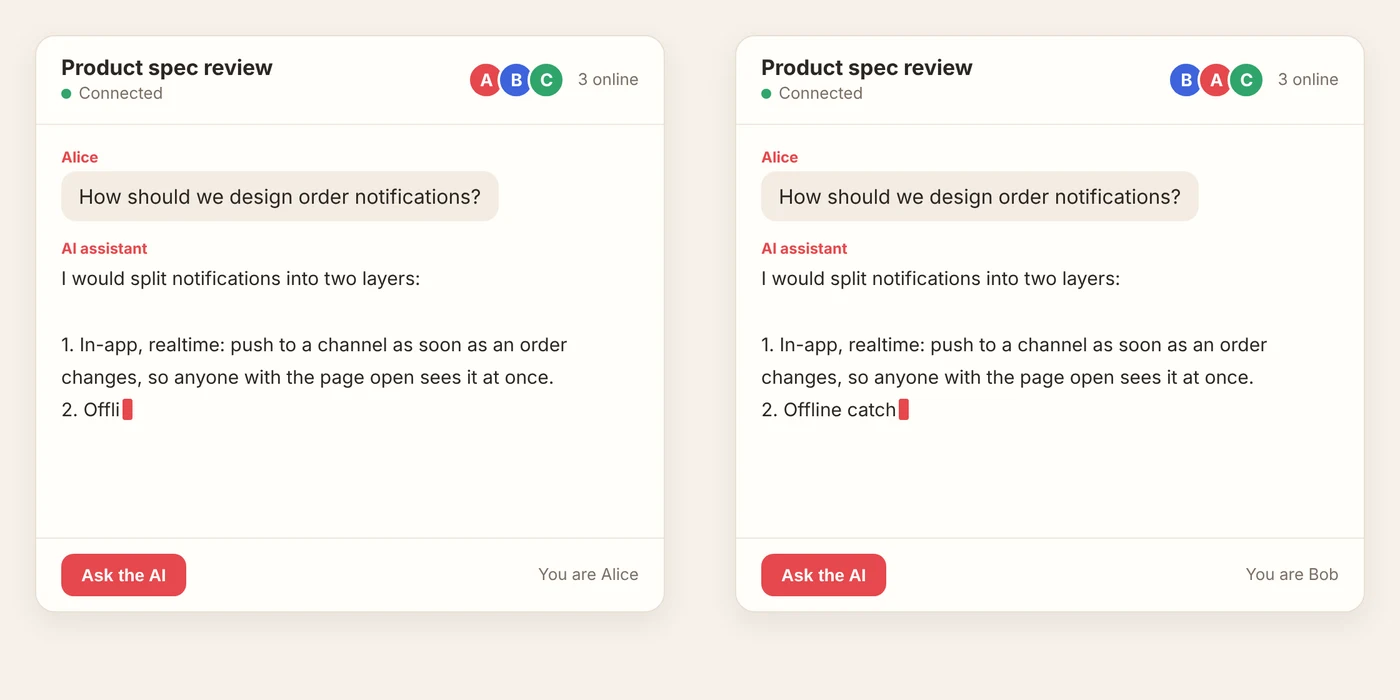
We took this screenshot while testing locally: Alice clicks "Ask the AI", and the answer appears on Alice's and Bob's screens at the same time. Bob doesn't have to do anything.
### Not one message per token
A model writes a few dozen tokens a second. Publishing one message per token turns a longer answer into a thousand messages: the message quota runs out fast, and the browsers on the other end re-render a thousand times.
`streamToChannel()` gathers tokens and publishes them every 100 milliseconds. However fast the model is, a channel gets about ten messages a second, and the text still looks like it is flowing.
```text
bars: Messages published for 1,000 tokens at 50 tokens a second (measured)
unit: messages
One per token: 1000
*streamToChannel(), one per 100 ms: 203
```
The faster the model, the bigger the saving: the same 1,000 tokens at 100 tokens a second take only 103 messages. Each message also stays under 3,500 bytes, below the Free plan's 4 KB limit, and long text is never split in the middle of a Chinese character or an emoji.
### Order, dropped connections and late joiners
Every message carries a sequence number. `useStream()` joins the text in that order, and if messages arrive out of order it waits for the missing one.
The last message carries the "done" mark and, when it fits in one message, the whole answer. That is for people who join late: Bob opens the page halfway through the answer and misses the beginning, but as soon as the last message arrives, his screen switches to the complete answer. The same goes for anyone whose connection dropped for a moment.
```text
sequence: Bob joins halfway through the answer
Your backend | *Hibira | Alice | Bob
1 > 2: messages 0–5 | the first part
2 > 3: messages 0–5
note: Bob opens the page and subscribes now
1 > 2: messages 6–9
2 > 3: messages 6–9
2 > 4: messages 6–9 | only the second half
1 > 2: message 10: done + full answer
2 > 3: done
2 > 4: full answer | Bob's screen catches up
```
If the answer is too long for the last message to carry it, late joiners see `incomplete: true`, and you can fetch the stored answer from your API once. When the model fails or is stopped, subscribers get an `error` too, rather than a spinner that never ends.
## What it looks like in code
### React
```jsx
import { HibiraProvider, useEvent, usePresence, useStream } from '@hibira-io/react';
export function App() {
return (
);
}
function Room({ id }) {
const { members } = usePresence(`presence-room-${id}`);
const { text, done } = useStream(`private-room-${id}-ai`);
useEvent(`private-room-${id}`, 'comment.created', (comment) => addComment(comment));
return (
<>
);
}
```
The backend (Node.js, any framework) passes the model's stream to `streamToChannel()` as it is. It understands the streams of Anthropic, OpenAI, Gemini and the Vercel AI SDK:
```js
import Pusher from 'pusher';
import { streamToChannel } from '@hibira-io/react/server';
const pusher = new Pusher({ appId, key, secret, host: 'ws.hibira.io', useTLS: true });
const stream = anthropic.messages.stream({ model, max_tokens: 1024, messages });
await streamToChannel(pusher, `private-room-${id}-ai`, stream, { meta: { asker: user.name } });
```
### Vue
Works on Vue 3 and Vue 2.7. Channel names can be refs or getters, so when a route parameter changes, the subscription follows:
```js
// main.js
createApp(App)
.use(createHibira({ appKey: import.meta.env.VITE_HIBIRA_KEY, options: { channelAuthorization: { endpoint: '/api/hibira/auth', transport: 'ajax' } } }))
.mount('#app');
```
```vue
```
### Nuxt
On Nuxt 3 and Nuxt 4 it is one line of module config. The composables are auto-imported, and server routes get `useHibiraServer()` and `streamToChannel()` too:
```ts
// nuxt.config.ts
export default defineNuxtConfig({
modules: ['@hibira-io/nuxt'],
});
```
```ts
// server/api/ask.post.ts
export default defineEventHandler(async (event) => {
const { roomId, question } = await readBody(event);
const stream = anthropic.messages.stream({ model, max_tokens: 1024, messages: [{ role: 'user', content: question }] });
event.waitUntil(streamToChannel(useHibiraServer(event), `private-room-${roomId}-ai`, stream));
return { ok: true };
});
```
Projects still on Nuxt 2 aren't left out: Nuxt 2.16 and later run on Vue 2.7, so use the `@hibira-io/nuxt/nuxt2` module.
## How we test them
All three packages are small and have no dependencies besides pusher-js. But they run in many environments, so the tests cover much more than the code itself:
- Unit tests on React 17, 18 and 19, and on Vue 3.5 and Vue 2.7.
- End-to-end tests: two clients connect to a real server, and we check presence joins and leaves, client events, and that a 200-token stream comes back whole on both sides.
- A small app each for Nuxt 4.6, 3.21 and 2.18, opened in Chromium as two users, checking the connection, presence, server events and streamed text, with no console errors and no hydration warnings.
## Get started
```sh
npm install @hibira-io/react pusher-js # React
npm install @hibira-io/vue pusher-js # Vue 3 / Vue 2.7
npx nuxi module add @hibira-io/nuxt # Nuxt 3 / 4
```
Before you start, set up a few things in the Hibira console:
- **Create an app and keep its credentials.** The app ID and key are always on the app's Overview page. The secret is shown only once, when you create the app, so put it in your backend's environment right away (for Nuxt: `NUXT_PUBLIC_HIBIRA_KEY`, `NUXT_HIBIRA_APP_ID`, `NUXT_HIBIRA_SECRET`). The key is public; the secret stays on the server.
- **Add allowed origins.** The Free plan can't use `*`: add your site's address (in development, for example `http://localhost:3000`) under Allowed origins, or the browser won't connect.
- **Add an auth route.** Private and presence channels need `/api/hibira/auth` on your backend to check who is signed in and sign the subscription. Each README has an example you can copy.
- **4 KB per message.** On the Free plan each event can be up to 4 KB. `streamToChannel()` already keeps its messages under that; watch the size of events you publish yourself.
To try the Alice and Bob screen yourself, use two different browsers, or a normal window and a private window, each signed in as a different user. Two tabs in the same browser are usually the same user, and presence counts them as one person.
All three are MIT licensed, with the source on GitHub: [hibira-io/react](https://github.com/hibira-io/react), [hibira-io/vue](https://github.com/hibira-io/vue), [hibira-io/nuxt](https://github.com/hibira-io/nuxt). They speak the Pusher protocol, so they work with any compatible server. If your project already uses Laravel Echo, pass in `echo.connector.pusher` and they share Echo's connection.
The Free plan needs no credit card. If you are about to add an AI assistant to your product, or you have a pile of hand-written `useEffect`s handling realtime messages, try switching one page to these hooks. If you have ideas, open an issue on GitHub and tell us.