
查询在线人数与观看人数
显示在线或正在观看的人数,用 presence 计算不重复的用户,并通过 HTTP API 和 webhook 从服务器读取每个房间的人数。
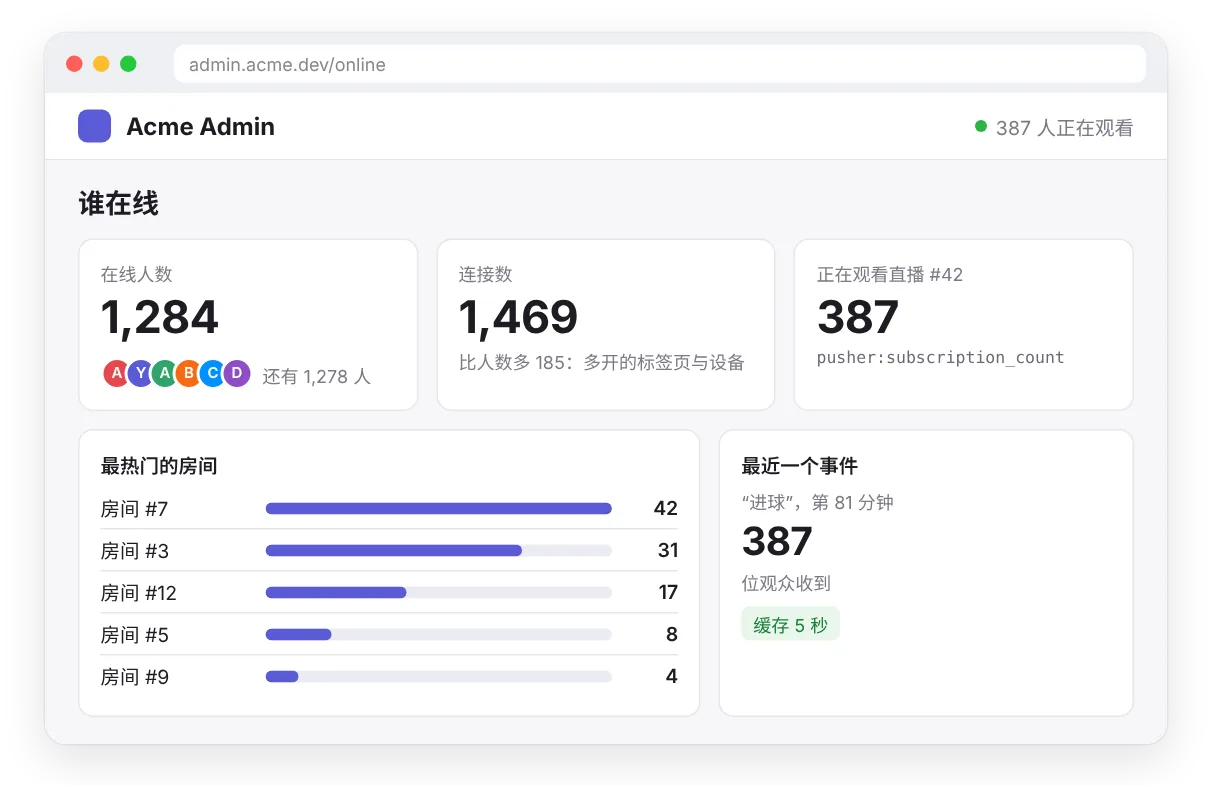
“1,284 人在线”“38 人正在观看”“房间已满”:一个实时的人数让产品显得热闹,同一个数字也告诉你的团队哪些房间最热门、什么时候该加派管理员、晚上的高峰有多高。你不必自己数连接。Hibira 本来就知道每个频道有谁订阅,而 Pusher 协议提供了四种查询方式。
用户得到什么
- 随着有人进出而跳动的“在线人数”或“正在观看”。
- 一排头像加上“还有 120 人”,同一个人开两个标签页只算一次。
- 房间在有人尝试加入之前就显示“已满”。
- 给你的团队:一个列出最热门房间的管理页,以及高峰的历史记录。
用到的功能
- 订阅人数(
pusher:subscription_count),在浏览器里获取公开与私有频道的人数。 - Presence 频道(
presence-)计算不重复的用户,大型 presence 频道(presence-large-)最多可容纳 100,000 名成员。 - HTTP API(
GET /channels),让你的服务器随时读取人数。 - Webhook(
member_added、member_removed、subscription_count),人数变化时通知你,方便保留历史记录。
在浏览器里
pusher:subscription_count你的服务器查询
GET /channels?info=user_count你的服务器收到通知
member_added算连接还是算人?
这是两个不同的数字,值得有意识地选择:
subscription_count算的是连接。一个人开三个标签页就算三次。它在公开与私有频道上都能用,不需要登录,适合公开页面上的“正在观看”计数。user_count算的是 presence 频道上不重复的用户,依据你的服务器签发的user_id。两个标签页,或一部手机加一台笔记本,都只算一次。只要“人”才是重点,例如座位上限或在线名单,就用它。
步骤 1:在浏览器里显示人数
在应用设置里打开 发送订阅人数。之后公开或私有频道的每位订阅者都会收到当前的人数,人数变动时最多每秒一次:
const stream = pusher.subscribe('stream-42');
stream.bind('pusher:subscription_count', ({ subscription_count }) => {
  watching.textContent = subscription_count.toLocaleString();
});不写程序也行,一行嵌入脚本可以做到同样的事:<span data-hibira-online="stream-42">0</span> 人正在观看。
步骤 2:用 presence 计算人数
在 presence 频道上,每个人都会收到成员列表,所以人数已经在浏览器里了:
const room = pusher.subscribe('presence-room-' + roomId);
const show = () => online.render(room.members.count, room.members);

room.bind('pusher:subscription_succeeded', show);
room.bind('pusher:member_added', show);
room.bind('pusher:member_removed', show);
Presence 频道最多 100 名成员,因为每位成员都会收到每一次加入。如果是整个网站或大型活动,就让每个页面加入同一个大型 presence 频道,配合 @hibira-io/large-presence。它最多容纳 100,000 名成员,每秒发送一次精确人数和在场者的样本:
import { LargePresence } from '@hibira-io/large-presence';

const site = LargePresence.subscribe(pusher, 'presence-large-site', { maxMembers: 12 });
site.on('ready', ({ count }) => badge.render(count, site.members));
site.on('change', ({ count }) => badge.render(count, site.members));
步骤 3:从你的服务器查询
你的服务器可以通过 HTTP API 读取同样的数字,任何兼容 Pusher 的服务器库都可以。查询单个频道:
const res = await pusher.get({
  path: '/channels/presence-room-42',
  params: { info: 'user_count,subscription_count' },
});
const { occupied, user_count, subscription_count } = await res.json();
一次查询所有房间,最热门的排在前面:
const res = await pusher.get({
  path: '/channels',
  params: { filter_by_prefix: 'presence-room-', info: 'user_count' },
});
const { channels } = await res.json();
// { "presence-room-7": { "user_count": 42 }, "presence-room-9": { "user_count": 17 } }
const busiest = Object.entries(channels)
  .map(([name, { user_count }]) => ({ name, users: user_count }))
  .sort((a, b) => b.users - a.users);
要在签发订阅之前检查座位上限,就在频道授权路由里读取房间人数,满了就拒绝:
app.post('/pusher/auth', requireLogin, async (req, res) => {
  const { socket_id, channel_name } = req.body;
  const room = await pusher.get({ path: `/channels/${channel_name}`, params: { info: 'user_count' } });
  const { user_count } = await room.json();
  if (user_count >= 8) return res.status(403).json({ error: 'room_full' });
  res.json(pusher.authorizeChannel(socket_id, channel_name, { user_id: req.user.id, user_info: { name: req.user.name } }));
});
发布事件时,也可以询问当下有多少连接订阅,知道这个事件送到了多少人:
const sent = await pusher.trigger('stream-42', 'goal', { minute: 81 }, { info: 'subscription_count' });
const { channels } = await sent.json();
console.log(`reached ${channels['stream-42'].subscription_count} viewers`);
user_count 只能用在 presence 频道;在频道列表上查询时需要加上 filter_by_prefix=presence-。把多个房间的人数相加,同时在两个房间的人会被算两次;要获取全站不重复的人数,请改读 GET /channels/presence-large-site?info=user_count。
步骤 4:用 webhook 保留历史记录
要画出晚上高峰的图表,或在房间清空时发出告警,就让 Hibira 通知你的服务器。在门户中为 member_added 和 member_removed(presence 频道)、subscription_count(公开与私有频道,开启计数时),或 channel_occupied 和 channel_vacated 添加 webhook:
app.post('/hibira/webhooks', express.text({ type: '*/*' }), async (req, res) => {
  const webhook = pusher.webhook({ headers: req.headers, rawBody: req.body });
  if (!webhook.isValid()) return res.sendStatus(401);
  for (const e of webhook.getEvents()) {
    if (e.name === 'member_added') await db.online.add(e.channel, e.user_id);
    if (e.name === 'member_removed') await db.online.remove(e.channel, e.user_id);
    if (e.name === 'subscription_count') await db.viewers.record(e.channel, e.subscription_count);
  }
  res.sendStatus(200);
});
小技巧
- 读取人数不会占用你的消息额度,只有发布的事件才算消息。不过仍建议在服务器上把 HTTP API 的结果缓存几秒,而不是每次页面浏览都查一次。
- Webhook 可能延迟或重复送达。用它来做历史记录与告警;需要当下精确的数字时,就读 HTTP API。
- 在热门的公开页面上显示取整的数字(“1.2k 在线”):跳动较少,依然有热闹的感觉。
- 人数以应用为单位。如果你有测试和正式两个应用,各自只看得到自己的连接。
- 套餐限制的是同时连接数,不是人数:每个套餐允许的高峰请见价格。