
Online user and viewer counts
Show how many people are online or watching, count unique users with presence, and read every room’s count from your server with the HTTP API and webhooks.
"1,284 online", "38 watching", "Room full": a live number of people makes a product feel busy, and the same number tells your team which rooms are hot, when to add a moderator and how large the evening peak was. You do not have to count connections yourself. Hibira already knows who is subscribed to each channel, and the Pusher protocol gives you four ways to ask.
What your users get
- An online or "watching now" count that moves as people arrive and leave.
- An avatar row with "+120 more", where people who have two tabs open count once.
- Rooms that say "full" before anyone tries to join.
- For your team: an admin page with the busiest rooms, and a history of the peaks.
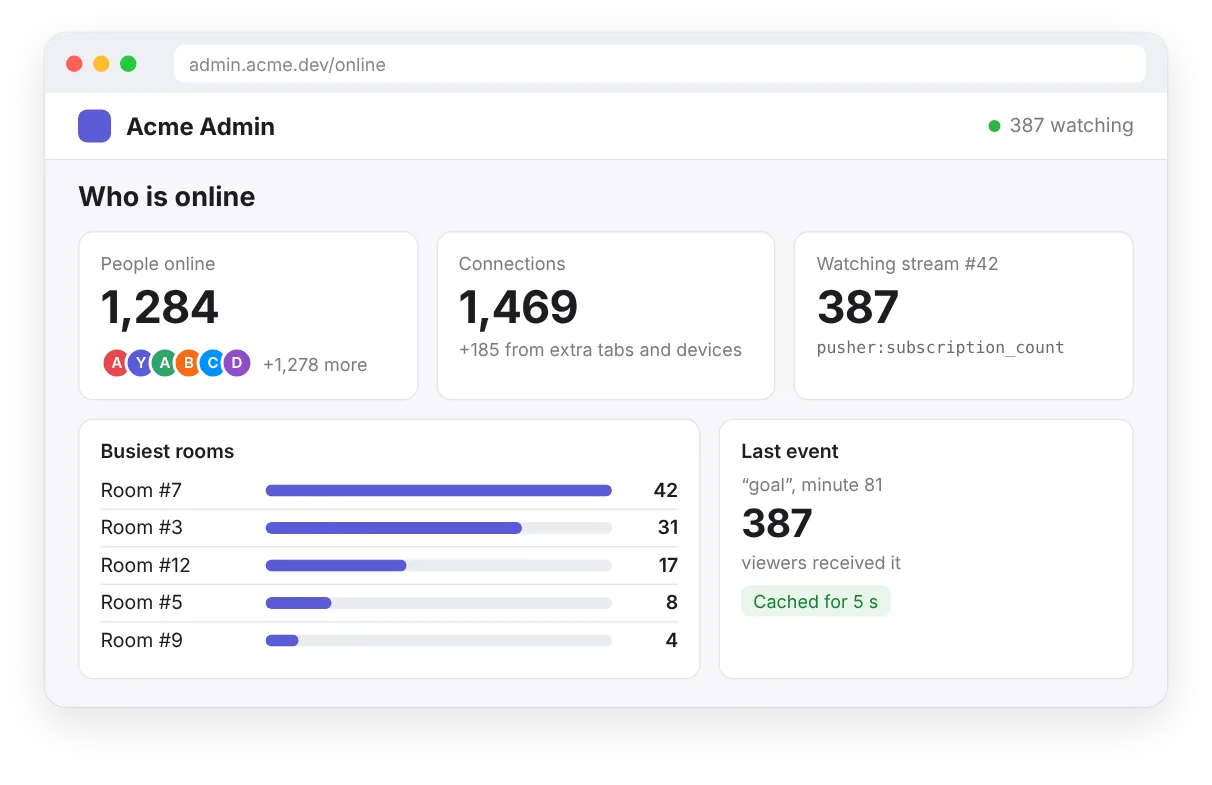
Built with
- Subscription counts (
pusher:subscription_count) for a count in the browser on public and private channels. - Presence channels (
presence-) for unique users, and large presence channels (presence-large-) for up to 100,000 members. - The HTTP API (
GET /channels) to read the counts from your server whenever you need them. - Webhooks (
member_added,member_removed,subscription_count) to be told when a count changes, so you can keep a history.
In the browser
pusher:subscription_countYour server asks
GET /channels?info=user_countYour server is told
member_addedConnections or people?
There are two different numbers, and it is worth choosing on purpose:
subscription_countcounts connections. A person with three tabs open counts three times. It works on public and private channels without any sign-in, so it fits a "watching" counter on a public page.user_countcounts unique users on a presence channel, by theuser_idyour server signed. Two tabs or a phone and a laptop count once. Use it whenever "people" matters, such as a seat limit or an online list.
Step 1: a count in the browser
Turn on Send subscriber counts in the app settings. Every subscriber of a public or private channel then receives the current count, at most once a second while it changes:
const stream = pusher.subscribe('stream-42');
stream.bind('pusher:subscription_count', ({ subscription_count }) => {
  watching.textContent = subscription_count.toLocaleString();
});
Without writing code, the one-line embed script does the same: <span data-hibira-online="stream-42">0</span> watching.
Step 2: count people with presence
On a presence channel, everyone receives the member list, so the count is already in the browser:
const room = pusher.subscribe('presence-room-' + roomId);
const show = () => online.render(room.members.count, room.members);

room.bind('pusher:subscription_succeeded', show);
room.bind('pusher:member_added', show);
room.bind('pusher:member_removed', show);
Presence channels hold up to 100 members, because every member receives every join. For a whole site or a big event, have every page join one large presence channel with @hibira-io/large-presence. It holds up to 100,000 members and sends the exact count with a sample of who is there, once a second:
import { LargePresence } from '@hibira-io/large-presence';

const site = LargePresence.subscribe(pusher, 'presence-large-site', { maxMembers: 12 });
site.on('ready', ({ count }) => badge.render(count, site.members));
site.on('change', ({ count }) => badge.render(count, site.members));
Step 3: ask from your server
Your server can read the same numbers through the HTTP API, with any Pusher-compatible server library. One channel:
const res = await pusher.get({
  path: '/channels/presence-room-42',
  params: { info: 'user_count,subscription_count' },
});
const { occupied, user_count, subscription_count } = await res.json();
Every room at once, with the busiest first:
const res = await pusher.get({
  path: '/channels',
  params: { filter_by_prefix: 'presence-room-', info: 'user_count' },
});
const { channels } = await res.json();
// { "presence-room-7": { "user_count": 42 }, "presence-room-9": { "user_count": 17 } }
const busiest = Object.entries(channels)
  .map(([name, { user_count }]) => ({ name, users: user_count }))
  .sort((a, b) => b.users - a.users);
To check a seat limit before you sign a subscription, read the room in your channel authorization route and refuse when it is full:
app.post('/pusher/auth', requireLogin, async (req, res) => {
  const { socket_id, channel_name } = req.body;
  const room = await pusher.get({ path: `/channels/${channel_name}`, params: { info: 'user_count' } });
  const { user_count } = await room.json();
  if (user_count >= 8) return res.status(403).json({ error: 'room_full' });
  res.json(pusher.authorizeChannel(socket_id, channel_name, { user_id: req.user.id, user_info: { name: req.user.name } }));
});
And when you publish, you can ask how many sockets were subscribed at that moment, which tells you how many people the event reached:
const sent = await pusher.trigger('stream-42', 'goal', { minute: 81 }, { info: 'subscription_count' });
const { channels } = await sent.json();
console.log(`reached ${channels['stream-42'].subscription_count} viewers`);
user_count can only be asked for on presence channels; on the channel list it needs filter_by_prefix=presence-. Adding the counts of several rooms counts twice anyone who is in two rooms at once; for a site-wide number of people, read GET /channels/presence-large-site?info=user_count instead.
Step 4: keep a history with webhooks
To draw a graph of the evening peak, or to send an alert when a room empties, let Hibira tell your server. In the portal, add a webhook for member_added and member_removed (presence channels), subscription_count (public and private channels, when counting is on), or channel_occupied and channel_vacated:
app.post('/hibira/webhooks', express.text({ type: '*/*' }), async (req, res) => {
  const webhook = pusher.webhook({ headers: req.headers, rawBody: req.body });
  if (!webhook.isValid()) return res.sendStatus(401);
  for (const e of webhook.getEvents()) {
    if (e.name === 'member_added') await db.online.add(e.channel, e.user_id);
    if (e.name === 'member_removed') await db.online.remove(e.channel, e.user_id);
    if (e.name === 'subscription_count') await db.viewers.record(e.channel, e.subscription_count);
  }
  res.sendStatus(200);
});
Tips
- Reading counts does not use your message quota; only published events count as messages. Still, cache the HTTP API answer for a few seconds on your server rather than asking once per page view.
- Webhooks can arrive late or twice. Keep them for history and alerts, and read the HTTP API when you need the exact number now.
- Show a rounded number on busy public pages ("1.2k online"): it moves less, and it still feels alive.
- Counts are per app. If you run a staging and a production app, each sees only its own connections.
- Plans limit concurrent connections, not counts: see pricing for the peak each plan allows.