
官方套件 · 自動化與基礎架構
讓開賣公平排隊的 Shopify 應用程式
從 Shopify App Store 安裝 Hibira Waiting Room,開啟應用程式嵌入並排定開賣。顧客在公平的隊伍中看到自己的號碼和預估等候時間,依你設定的速度放行;想插隊的人會被結帳規則擋下。不需要 Shopify Plus。
Hibira Waiting Room (Shopify app)GitHub ↗
- 代管的等候頁顯示每位顧客的號碼、前面還有幾人和預估等候時間,支援七種語言。
- 可讓整個商店或只有特定標籤的商品排隊,提早開放排隊,依到達順序決定先後。
- 開賣期間,結帳規則會擋下沒有通行證的訂單,包括分享的購物車連結和「立即購買」。
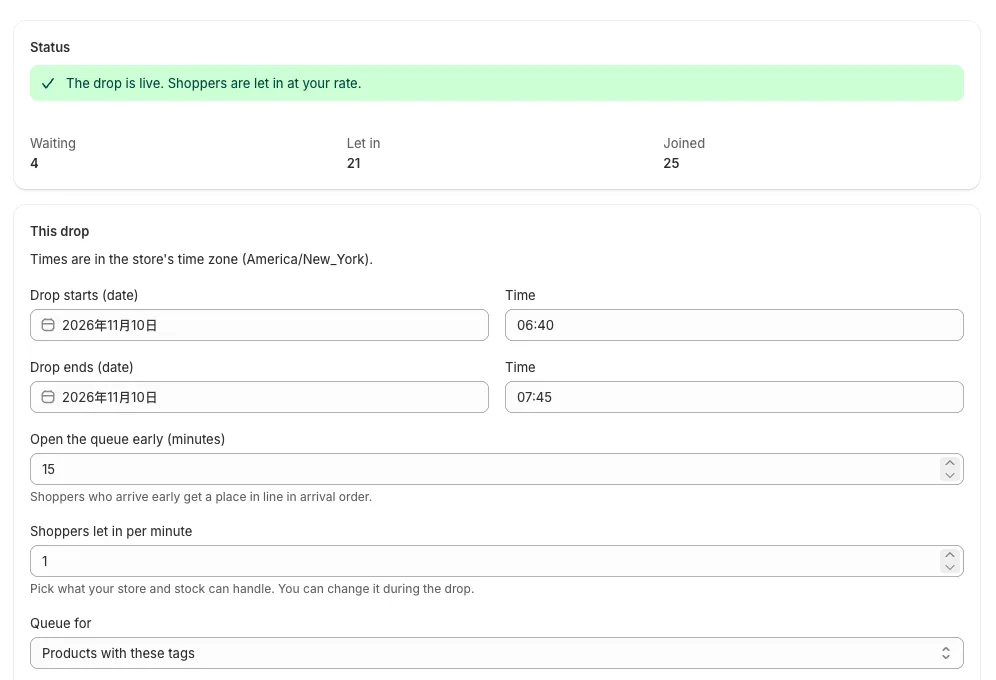
- 在 Shopify 後台即時查看等候中和已放行人數,開賣中也能調整放行速度。
登入後,範例程式碼會自動帶入您的叢集主機。 登入
安裝
Shopify admin → Apps → Shopify App Store
  → search "Hibira Waiting Room" → Install
The app opens in your admin. There is nothing to sign up for.
在佈景主題中開啟
Hibira Waiting Room → Setup → Open theme editor
  → turn on "Hibira Waiting Room" → Save
It does nothing until a drop is scheduled.
排定開賣
Hibira Waiting Room → Schedule a drop
  Drop starts / Drop ends        2026-12-01 10:00 → 12:00
  Open the queue early (minutes) 15
  Shoppers let in per minute     60
  Queue for                      Products with these tags: drop
  → Schedule drop
開始之前
- 結帳規則會自動加到「設定 → 結帳 → 結帳規則」,只在開賣期間啟用。除 Starter 外,所有 Shopify 方案都能使用。
- Free 每月含 5,000 位排隊顧客。Drop、Launch、Event 方案和單場活動通行證由 Shopify 在帳單上收費。開發商店為測試收費。
- 每次開賣都從 1 號重新排隊。開賣中調整放行速度,每個人的號碼都不變。
請使用儀表板中的應用程式 Key;Secret 只放在你的伺服器上。頻道、事件與授權端點的用法和 Pusher 完全相同。 免費建立帳號 →