
Stream AI answers to every screen
Chatbots, copilots and AI agents: answers that appear as they are written, reach every tab and device, and pick up after a reload.
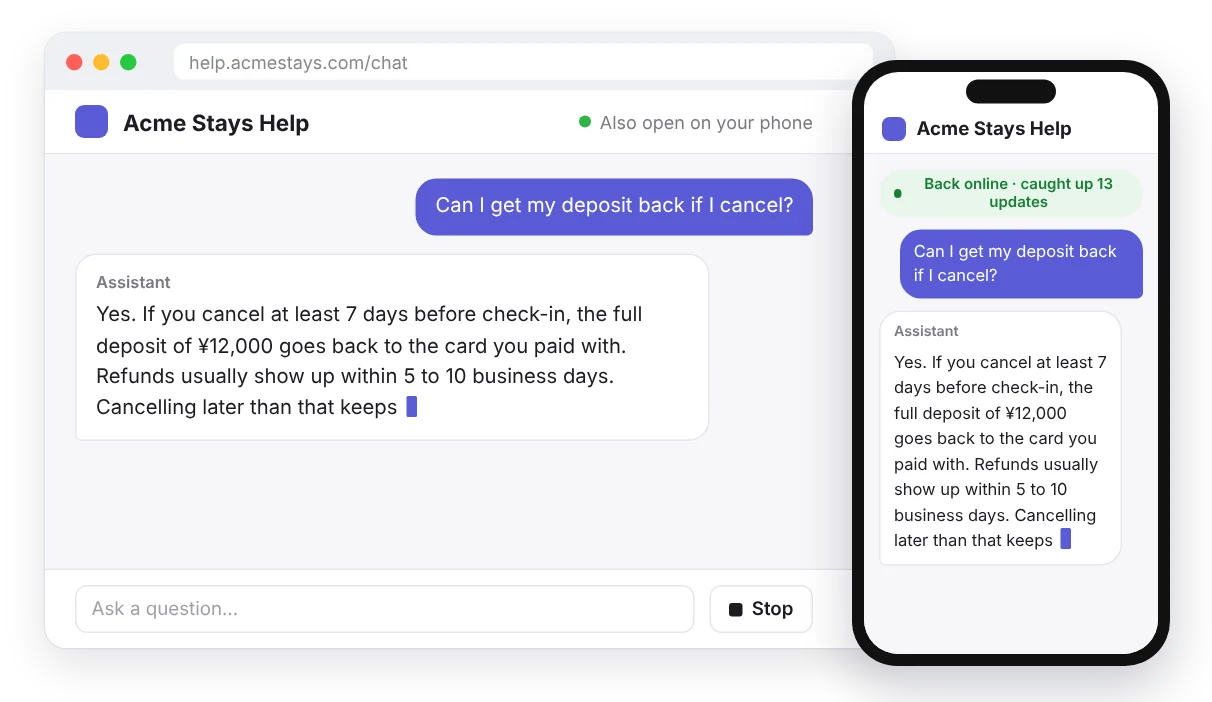
Chatbots, copilots and AI agents feel fast when the answer appears as the model writes it. Most apps stream it over the one HTTP response that asked the question. That works until the user reloads the page, opens a second tab, switches to their phone, or a teammate wants to watch the same answer. A long answer can also outlive a serverless function's time limit. Publishing the answer to a channel separates the model's work from the browser's connection: every screen that is subscribed sees the same text, and a screen that drops off catches up from channel history. Our open-source packages do the batching, ordering and catching up for the common stacks, so you add a few lines instead of writing that yourself.
What your users get
- Answers that appear word by word, without a long wait for the whole reply.
- The same answer in every tab and on every device, and for everyone in a shared chat.
- An answer that keeps going after a reload or a lost connection, picking up the missing text instead of starting over.
- A Stop button, and answers that keep coming after the user has closed the tab, so the result is ready when they come back.
Built with
- Private channels, so only people allowed in the conversation can read its answers. Your auth endpoint checks that.
- Channel history (
pusher:rewind, Hobby plans and up, turned on per app in its settings), so a screen that reconnects gets the events it missed. - Our packages for the Vercel AI SDK, React, Vue, Nuxt and Laravel. They batch tokens into events under the 4 KB Free limit, number them and put them back in order.
- Your own model and API key: any model that streams text works. Hibira only carries the text to your users.
Pick the package for your stack
| You use | Package | In the browser |
|---|---|---|
Vercel AI SDK useChat | @hibira-io/ai-sdk | HibiraChatTransport |
| Anthropic, OpenAI or Gemini SDK, with React or Vue | @hibira-io/react, @hibira-io/vue | useStream() |
| Laravel AI SDK agents | hibira-io/laravel | useAgentStream() |
| Another language or framework | any Pusher server library | pusher-js |
Vercel AI SDK: a transport for useChat
useChat() keeps working as it is; the answer comes over the channel instead of the HTTP response. In the browser:
import { useChat } from '@ai-sdk/react';
import { HibiraChatTransport } from '@hibira-io/ai-sdk';

const transport = new HibiraChatTransport({ pusher, api: '/api/chat' });

export function Chat({ id, initialMessages }) {
  const { messages, sendMessage, status } = useChat({ id, messages: initialMessages, transport, resume: true });
  // render messages as usual
}
The API route answers at once and publishes the model's stream in the background:
import { after } from 'next/server';
import { streamText, convertToModelMessages } from 'ai';
import { publishUIMessageStream } from '@hibira-io/ai-sdk/server';

export async function POST(req: Request) {
  const { id, messages, runId } = await req.json();
  const result = streamText({ model, messages: await convertToModelMessages(messages) });
  after(() =>
    publishUIMessageStream(pusher, {
      chatId: id,
      runId,
      stream: result.toUIMessageStream({ originalMessages: messages, onFinish: ({ messages }) => saveChat(id, messages) }),
    }),
  );
  return Response.json({ runId }, { status: 202 });
}
The transport subscribes to private-ai-chat-{chatId}, so allow that channel only for the chat's owner in your auth endpoint. With resume: true, a reloaded page picks up an answer that is still being written.
React or Vue with any model SDK
streamToChannel() takes the stream of the Anthropic, OpenAI or Gemini SDK as it is:
import { streamToChannel } from '@hibira-io/react/server';

export async function POST(req) {
  const { conversationId, question } = await req.json();
  const stream = anthropic.messages.stream({ model, max_tokens: 1024, messages: [{ role: 'user', content: question }] });
  const id = crypto.randomUUID();
  streamToChannel(pusher, `private-conversation-${conversationId}`, stream, { id }).catch(console.error);
  return Response.json({ id });
}
import { useStream } from '@hibira-io/react';
function Answer({ conversationId }) {
const { text, done, error } = useStream(`private-conversation-${conversationId}`, { rewind: true });
return <p aria-busy={!done}>{text}{error && <em> ({error})</em>}</p>;
}@hibira-io/vue has the same useStream(), and Nuxt imports it for you. To add a Stop button, pass signal from an AbortController to streamToChannel() and abort it from your stop route.
Laravel AI SDK agents
Queue the agent and broadcast its events to the user's private channel; text, reasoning, tool calls and approval requests arrive in order, split into parts when they are bigger than your plan's event size:
use Hibira\Laravel\Ai\AgentChannel;

(new SalesCoach)->broadcastOnQueue($request->input('prompt'), AgentChannel::user($request->user()));
const { text, status, toolCalls, approvals } = useAgentStream(`private-hibira-ai.user.${user.id}`, { rewind: true });status is streaming, awaiting_approval, done or error, so the page can show what the agent is doing.
Agent steps and approvals
To show each step of an agent's work, ask a person before a risky tool runs, or let an agent in an MCP client report progress, see AI agents: live steps, approvals and alerts. It uses the same channels, so one page can show the streamed answer and the agent's steps together.
Without a package
From any Pusher server library, send what the model wrote every 100 ms and number each batch, so the browser can put them in order and notice a gap:
seq, buffer, last = 0, "", time.monotonic()
for delta in model_stream:
    buffer += delta
    if time.monotonic() - last >= 0.1 or len(buffer) >= 1000:
        pusher_client.trigger(f"private-chat-{chat_id}", "ai-delta", {"id": answer_id, "seq": seq, "text": buffer})
        seq, buffer, last = seq + 1, "", time.monotonic()
pusher_client.trigger(f"private-chat-{chat_id}", "ai-done", {"id": answer_id, "seq": seq, "text": buffer})
Save the finished answer in your database, and load it once when the page opens or reconnects. See progress for long jobs for the same pattern with queue workers.
Tips
- Every publish is one message, however many screens receive it. At 50 tokens a second, a 20-second answer is about 1,000 messages sent token by token, and about 200 in 100 ms batches.
- Keep each event under your plan's event size (4 KB on Free, see pricing). The packages stay under 3,500 bytes and split anything bigger.
- Channel history is on Hobby plans and up. Without it the packages still stream, and a screen that missed part of an answer shows it as incomplete instead of broken.
- A plain HTTP stream is enough for a single tab that is never reloaded. Use a channel when answers must survive reloads, reach several devices or people, or come from a background job.
- If the user has closed the app before a long answer or agent task finishes, send a push notification with the push notifications guide.