
Filament admin panels in realtime: why we built hibira-io/filament
· Hibira
Edit locks without heartbeats, tables that refresh themselves, live import progress, team chat and AI agents that hold edit locks like people, plus collaborative editing, AI approvals and AI live chat for Filament 3, 4 and 5. Why we built them and how they work.

An admin panel is often the page a team keeps open longest. Orders, customers, products and support tickets all live there, and it is rarely used by one person at a time. Admin panels built with Filament are no different, and the same problems come up again and again:
- Two people open the same record, and whoever saves last quietly overwrites the other's changes.
- You import a CSV with a few thousand rows, the page says "started", and all you can do is keep refreshing.
- A colleague's new record only shows up after you reload, and the notification bell polls every 30 seconds.
All of these ask the same question: how does the panel know what someone else just did? That is exactly what a realtime connection is good at, so we built a Filament plugin: hibira-io/filament.
What people use today
Before writing any code, we went through the realtime plugins in the filamentphp.com directory. The need is clearly there, and it falls into a few groups:
- Who's online: show who else is looking at a page.
- Edit locks: let one person edit a record at a time.
- Panel chat: let admins message each other.
- Live tables and notifications: refresh when data changes.
Three things they had in common made us stop and think:
- Almost all of them need you to run a WebSocket server first (usually Laravel Reverb) and set up Echo. For a team that just wants a livelier admin panel, that is a whole system to operate.
- Most of them only support Filament 5, so projects still on 3 or 4 are left out.
- Edit locks mostly rely on heartbeats: every open page calls an API every few seconds to say "I'm still here", and the lock lives in a database table. With enough people, those calls become most of the panel's traffic, and when someone simply closes their laptop the lock waits for a timeout.
Our approach: install it and it connects
Filament already supports any Pusher-compatible realtime service; you just have to publish its config file, uncomment the Echo block and fill in the host and key. Hibira speaks the Pusher Channels protocol, so the first step was simple: the plugin reads the HIBIRA_* settings your project already has and wires up Echo for you, without touching config/filament.php.
composer require hibira-io/filament
php artisan hibira:install
use Hibira\Filament\HibiraPlugin;
$panel->plugin(
HibiraPlugin::make()
->databaseNotifications()
->presence()
->liveTables()
->importProgress()
->chat()
);Then we built each of those four groups into the same plugin. It works on Filament 3, 4 and 5, and every feature is one line to turn on or off.
First-time setup
- Sign up and create an app. The app ID and key are on the Credentials card of the app's Overview tab. The secret is shown only once, right after the app is created, so paste it into
.envstraight away. If you miss it, use Rotate secret on the same card. - On the Settings tab, add your panel's address under Allowed origins, for example
https://admin.example.com, plushttp://localhost:8000for local development. The Free plan needs each origin listed;*is for paid plans. If an origin is missing, browsers are refused and the connection light next to the user menu never turns green. - If the project has no
routes/channels.phpyet, runphp artisan install:broadcasting --without-reverb --without-node. Private and presence channels are authorized through it. - Run the two commands above, put the app ID, key and secret in
.env, and check the connection withphp artisan hibira:check.

Who's looking, who's editing
With ->presence() on, the avatars of everyone else on the same page appear at the top right. Each page path is its own room, so people on the list don't show up on a record's edit page.
For edit locks, add one line to an edit page: use InteractsWithHibiraLock;. The first person to open a record holds the lock. Anyone who comes in after sees who is editing, their Save button is disabled, and the server rejects their save too.

Someone who wants to take over can press Ask to edit. The holder gets a prompt, and Save and hand over saves their unfinished changes before passing the lock across.

To try it yourself, open the same record as two different panel users in two browsers, or in a normal and a private window. Two tabs signed in as the same user count as one person, so the lock won't stop you.
A lock without heartbeats
This is the design we most wanted to share. Instead of having every browser check in on a timer, everyone who opens the same record joins the same presence channel. A presence channel already knows who is there and who left, and the moment a connection drops, Hibira tells the others.
When they hear that someone left, the others ask your app for the lock. Your app doesn't take the browser's word for it: it first asks Hibira who is in the channel right now, and only moves the lock if the holder is really gone. That means:
- No polling: when nobody comes or goes, there are no extra requests at all.
- No lock table: the holder lives in the cache you already have.
- Nothing gets stuck: if the holder's laptop just shuts down, the lock reaches the next person within seconds.
- Careful when it can't check: if the member list can't be read for a moment, the lock stays where it is. Waiting a little longer beats two people editing at once.
Tables that keep up
->liveTables() refreshes a resource's list page for everyone who has it open whenever a record is created, updated or deleted, whether that happens in the panel, a queued job, an API call or a scheduled command.
We were careful about one thing here: an import should not become a thousand messages. The plugin collects the changes made during one request or queued job and sends a single notice when it ends. Browsers then wait 300 ms and fold back-to-back notices into one refresh. Importing a thousand rows refreshes each open table about once per chunk, not a thousand times.
How far along is that import?
Filament runs imports and exports in the background in chunks. It tells you when they finish, but not how they're going. With ->importProgress(), the person who started an import sees a progress card in the corner that moves forward with every chunk. It picks up again after a page reload and disappears a few seconds after the end.

It hooks into Filament's own ImportAction and ExportAction, works with custom importers, and needs no change to your existing code. Filament imports already need a queue worker running (php artisan queue:work), and that worker is what reports the progress.
Talk without leaving the panel
Last comes chat. ->chat() adds a Chat page and a button with the unread count to the top bar. Panel users can chat one to one or in groups, see who is online and scroll back through earlier messages.

Messages are stored by Hibira's Chat API, so there are no tables to create and no queues to run. Each browser signs in to Hibira as its panel user, and new messages, read receipts and online status all arrive over that sign-in, with no channel per conversation. The Chat API is in beta; ask us to turn it on for your account.
AI agents join the team (v0.3.0)
More and more admin panels have a second kind of user: an AI agent that refunds an order, tags a ticket or fixes an address. The changes are fine. The trouble is that nobody can see them coming. A person has the order open, the agent updates it in the background, and the person's next Save quietly puts the old values back.
So in v0.3.0 an agent joins a record's page the same way a person does. Wrap its change in Agent::edit():
use Hibira\Filament\Agents\Agent;

Agent::make('support-assistant')
    ->name('Support assistant')
    ->edit($order, function () use ($order) {
        $order->update(['status' => 'refunded']);
    });
While the callback runs, the agent shows up in "Who's here" with a robot avatar and an "AI agent" label, and it holds the record's edit lock. People on the edit page see a banner, and their Save button is off until it finishes.
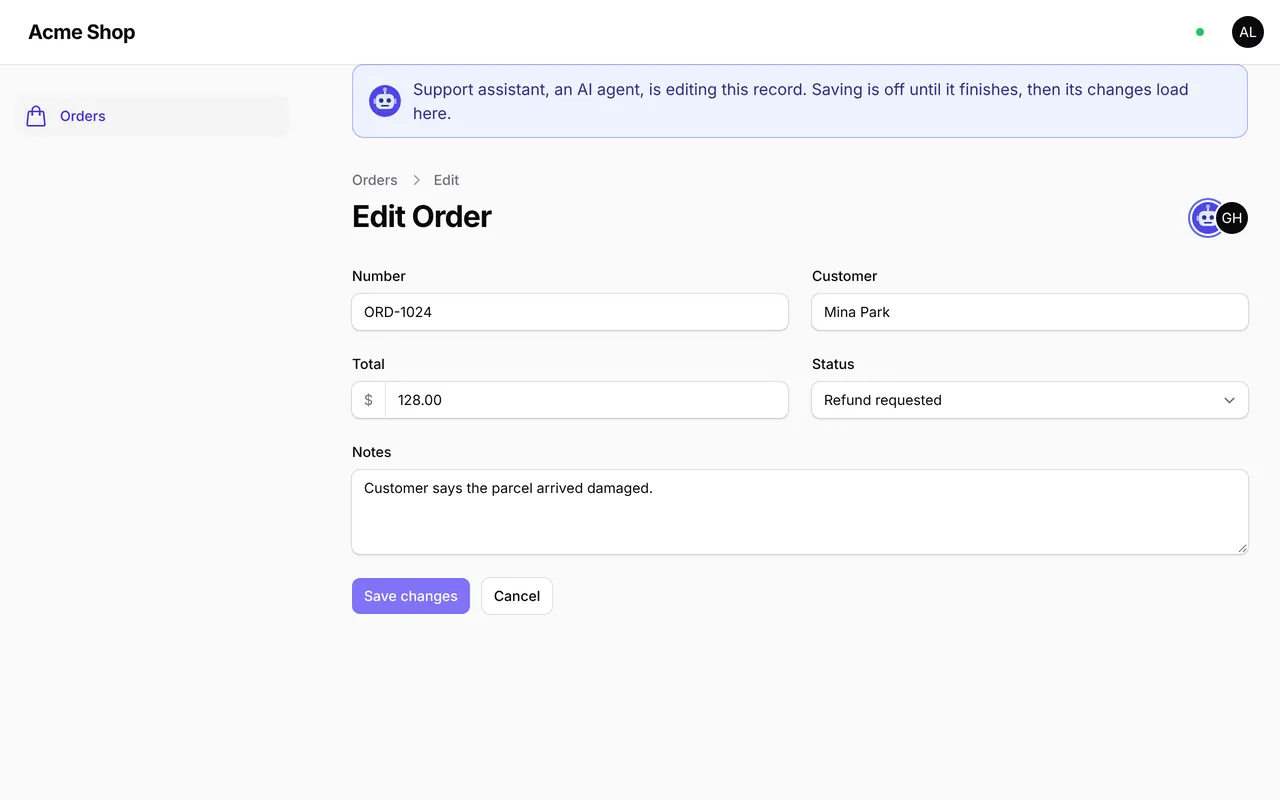
When the agent is done, it lets go, even if the callback throws. The next person on the page takes the lock and their form reloads with the agent's changes, so nobody saves over them. The same reload now happens when the lock passes between two people.
The agent follows the same rules as everyone else. If a person is editing the record, edit() throws RecordLockedException and does nothing. Pass wait: 20 and the agent asks instead: the person gets the usual Save and hand over prompt, and the agent waits up to 20 seconds.
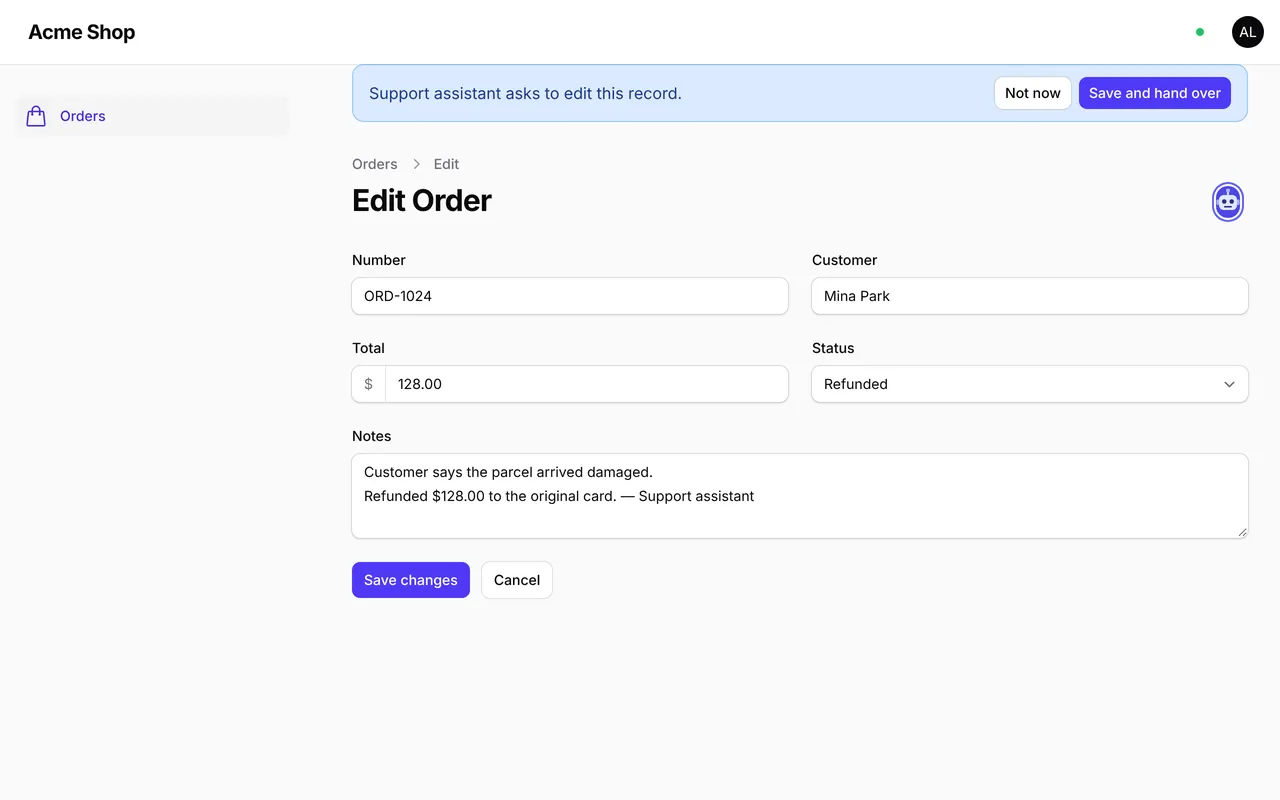
In a Laravel AI SDK tool, catch the exception and return a sentence, such as "Mina is editing this order right now", so the model can tell the user or try again later.
Three more plugins for the same panel
Once the panel was live, our users asked for the next pieces, and each became a small plugin of its own. They all use the connection hibira-io/filament sets up, so there is nothing new to configure.
Typing together: filament-collab
Edit locks fit records with a few fields. For a long text, such as an article, a product description or meeting notes, a lock means one person writes while everyone else waits. filament-collab adds a CollaborativeEditor field that several people type into at once, like a shared document. Changes merge on their own with Yjs, and each person's cursor and selection show with their name.

The document is stored in your database as people type, so someone who opens the page later, or comes back after losing their connection, picks up where everyone is. For Filament it is still a normal field: its state is HTML, like RichEditor, and the record saves with your usual Save button.
Approving what agents do: filament-approvals
Some agent actions should wait for a person, such as a refund over $20 or deleting an account. The Laravel AI SDK can pause a turn on such a tool. filament-approvals puts that pause in a live inbox in your panel: approve, reject with a reason the model will read, or edit the arguments first.
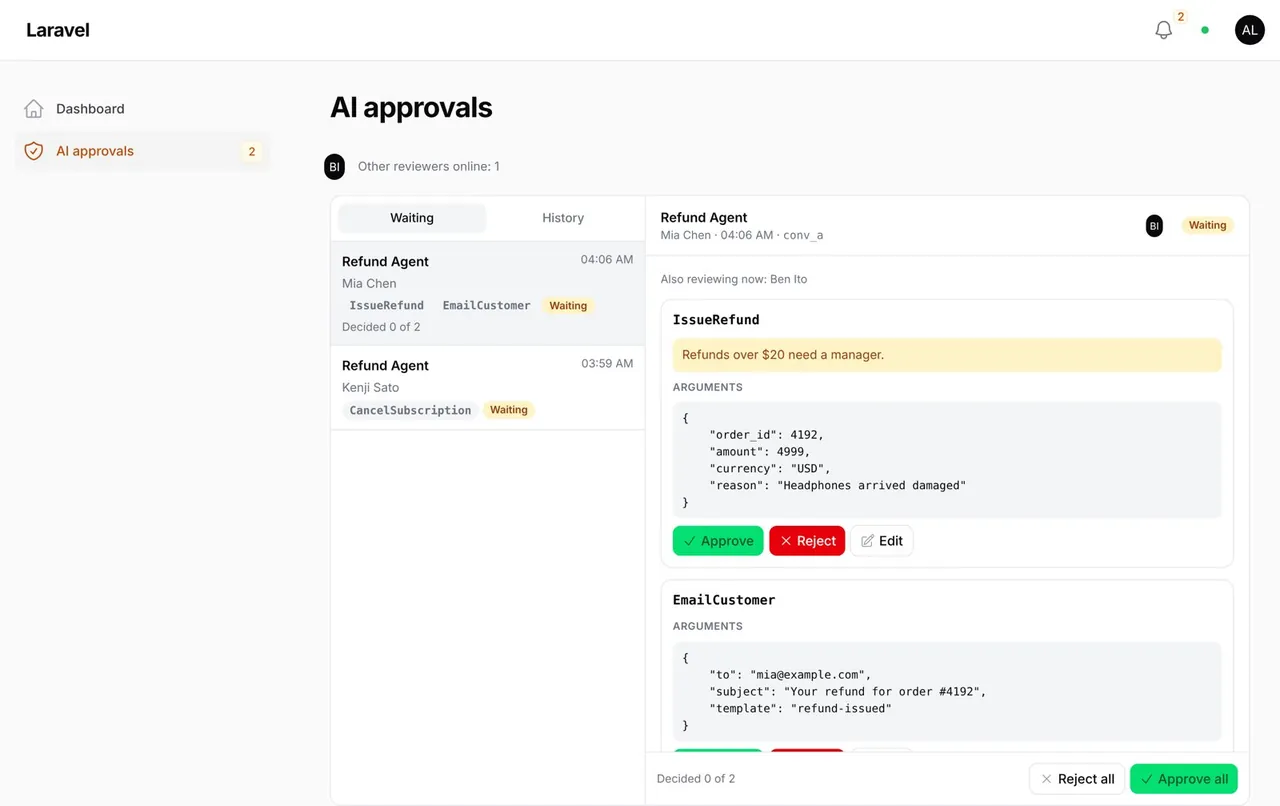
Reviewers see who else has the same request open, so two people don't decide the same refund. Approvers who don't have the panel open get a push notification. Once every call is decided, the agent carries on by itself on your queue, and the turn is resumed only once, even if two people press the button together.
Answering customers: filament-support
filament-support puts a chat on your website with one script tag. An AI answers visitors first, with your own API key (OpenAI, Anthropic, Gemini and others) and the knowledge you give it. When it isn't sure, or the visitor asks for a person, the conversation lands in a live inbox in your panel.
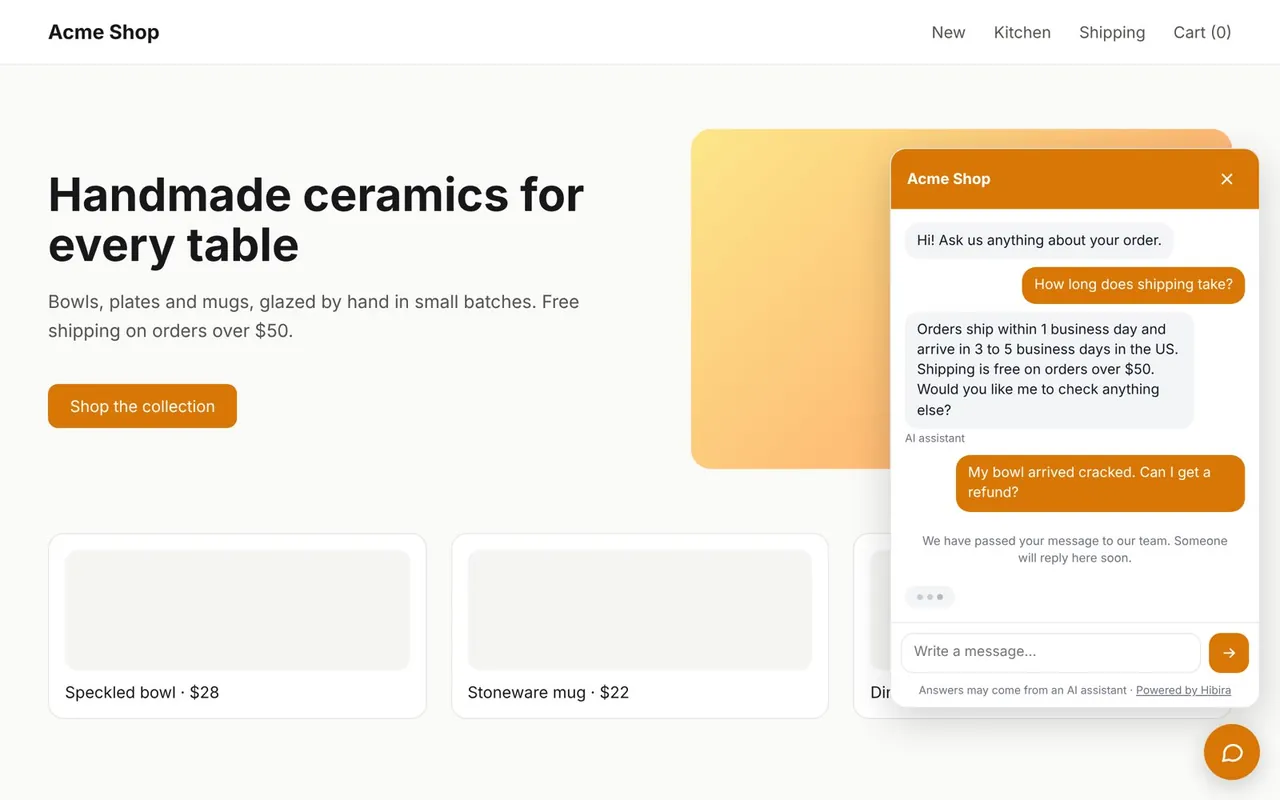
You choose the AI mode: off, suggested replies your team checks, or automatic answers. Refunds, payments, legal and security questions always go to a person, and once someone on your team replies, the AI stays out of that conversation. Conversations are stored in your own database; Hibira only delivers them live.
What it costs
The plugin itself is open source under the MIT license. Realtime messages count the way they always do on Hibira: each published event counts once, however many people receive it, and a chat message counts once per member it is delivered to. Sending one notice per request and locking without heartbeats keep the panel smooth, and they keep usage low too. For a typical team's admin panel, the Free plan's 200,000 messages a day are usually plenty.
Two more Free plan numbers worth knowing up front: up to 100 connections at once, where every open panel tab counts as one, and 4 KB per event. The plugin's events are a few hundred bytes. If you broadcast your own events on the same app, keep each one under 4 KB.
Get started
- Code and docs: github.com/hibira-io/filament
- Install:
composer require hibira-io/filament - Supports Filament 3, 4 and 5 on Laravel 10 or later
- AI agents in presence and edit locks:
hibira-io/filamentv0.3.0 or later - Collaborative editor: hibira-io/filament-collab
- AI approvals inbox: hibira-io/filament-approvals (Filament 3.3, 4 and 5 on Laravel 12 or later)
- AI live chat support: hibira-io/filament-support
- No Hibira account yet? Sign up for free, no credit card needed
If there is another part of your admin panel you wish were a little more live, open an issue on GitHub and tell us.