Hibira Live Chat for Shopify

Answer shoppers while they are still on the page

A chat button on every page of your store, in your shoppers' language. Your staff open the inbox from the Shopify admin, already signed in, and reply in real time.

Read the setup guideSee plans

Free plan. Billed by Shopify, cancel any time.

What shoppers see

A chat button on every page

The button sits in the corner of your store and opens a small chat window. Shoppers type a question without leaving the product they are looking at.

Answers arrive live

Replies show up in the chat as soon as your staff send them, with their name and photo, and shoppers can see when someone is typing.

In your shoppers' language

The chat speaks English, Japanese, Korean, Traditional and Simplified Chinese, Thai and Vietnamese, following the shopper's browser.

Your colour

Pick the button colour in the theme editor so the chat matches your store.
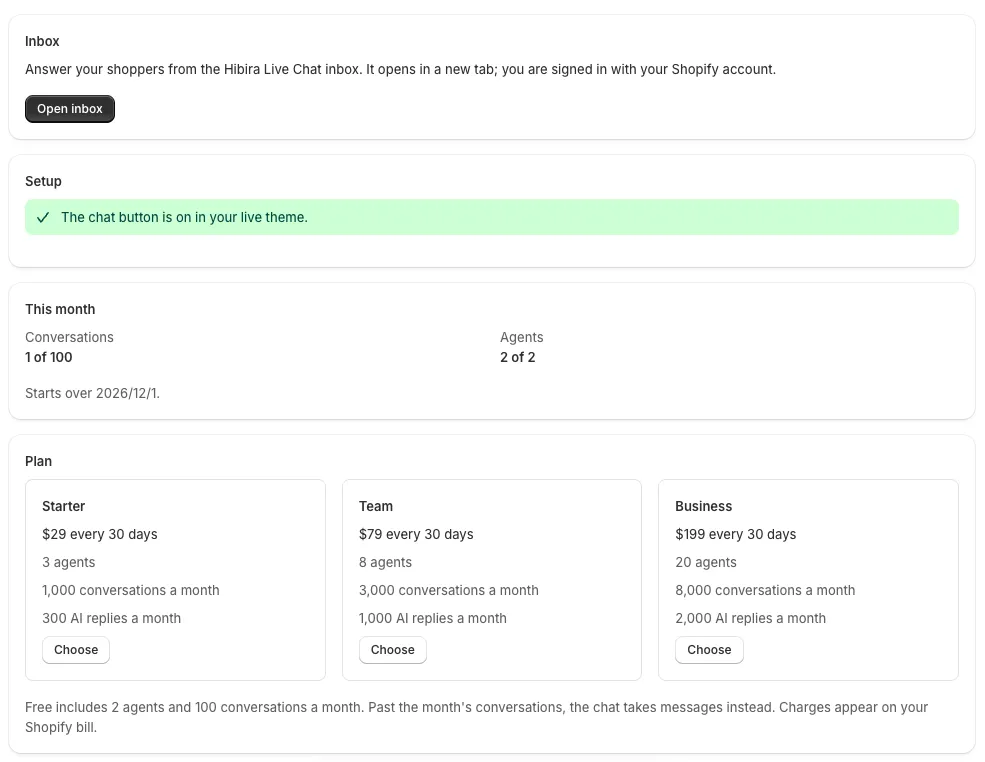
What you see

The app in the Shopify admin: an Open inbox button, a check that the chat button is on in the live theme, this month's conversations and agents, and the three paid plans.

Open the app in your Shopify admin to see this month's conversations and agents, and press Open inbox. The inbox opens in a new tab and signs your staff in with their Shopify account, so nobody needs another password. In the inbox, assign chats, leave internal notes, and see which page each shopper wrote from. On paid plans, AI can answer common questions from your own Q&A and hand the rest to a person.

Plans

Business

$199 / 30 days
  • Agents 20
  • Conversations a month 8,000
  • AI replies a month 2,000

Plans are billed by Shopify on your store invoice. Past the month's conversations, the chat keeps taking messages so no shopper is turned away, and you answer them when you can.

How to set it up

  1. Install Hibira Live Chat on your store.
  2. Turn on the app embed: open the app and press Open theme editor, turn on Hibira Live Chat, pick a colour, then Save.
  3. Open the inbox from the app and answer your first shopper.

The setup guide has every step.

Frequently asked questions

Do I need a Hibira account?

No. Installing the app creates your inbox, and staff sign in from the Shopify admin with their Shopify account.

Who can answer chats?

Staff who open the inbox from the app join as agents while your plan has a free seat: 2 on Free, up to 20 on Business.

What do shoppers see next to a reply?

The agent's first name and photo. Each agent can change the name shoppers see in the inbox, under Settings → Your profile.

Does it slow my store down?

No. The app embed adds one small script that loads after your page, and the chat window opens only when a shopper presses the button.

What happens when nobody is online?

Shoppers can still write. The chat tells them you'll reply there, and the conversation waits in the inbox.

Does it work with my theme?

Yes. The chat button is an app embed, so it works with Online Store 2.0 themes such as Dawn without editing theme code.