Hibira Live Visitors for Shopify

Show shoppers who else is looking, honestly

A small line under the price tells shoppers how many people are on the product right now, and Pro adds a popup each time someone really buys. Every number is a real open tab, never invented or rounded up.

Read the setup guideSee plans

Free plan. Billed by Shopify, cancel any time.

What shoppers see

"3 people are viewing this right now"

The line sits under Add to cart, or wherever you place the Viewing now block, and changes within seconds as people arrive and leave. Below the minimum you set it stays hidden, so a quiet product never shows a sad "0".

"Someone just bought" popups

On Pro, a small popup shows the product of each real order as it happens, and recent orders to the next shoppers. It shows the product only: never a customer name, city or email.

"12 people shopping now"

On Pro, the Viewing now block can count the whole store instead of one product, for the home page, collections or a sale banner.

In your shoppers' language

The text follows the store language: English, Japanese, Korean, Traditional and Simplified Chinese, Thai and Vietnamese. Or write your own wording in the theme editor.

Your theme, your colours

Pick the dot, text and popup colours, the popup corner, when the first popup appears and how old an order may be, all in the theme editor. No code to paste.

Light on the page

One script under 3 KB compressed, loaded after the page. Settings are kept in your store, so a page view never waits for our servers.
What you see

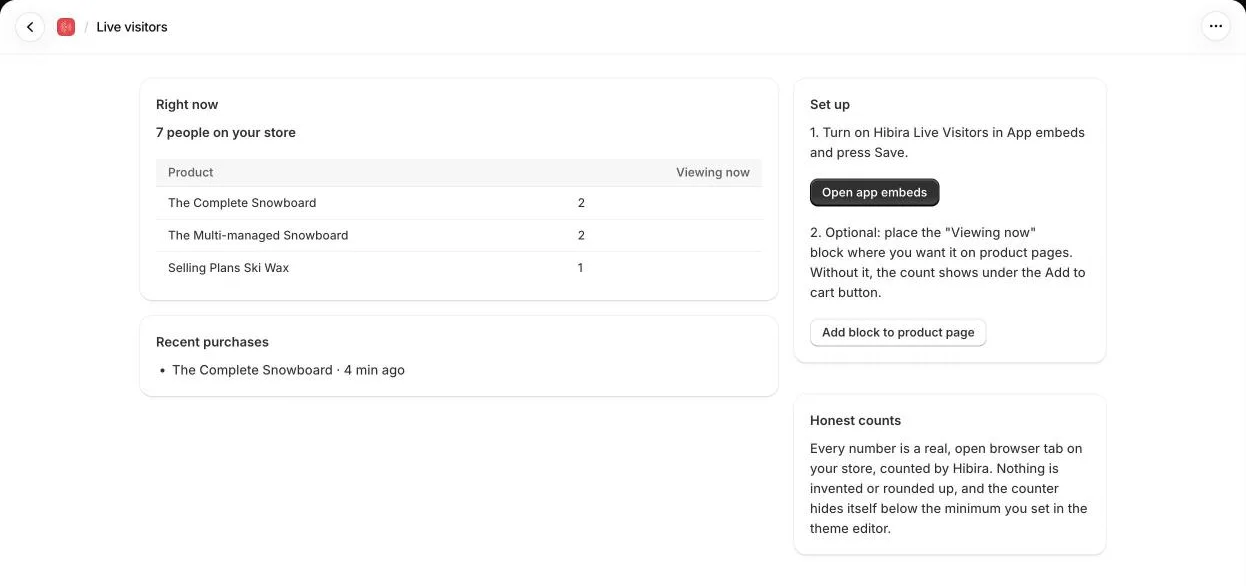
The app in the Shopify admin: shoppers on the store right now, the most viewed products and the latest purchases.

Open the app in your Shopify admin to see how many shoppers are on the store, which products they are looking at and, on Pro, the latest purchases. The page speaks the same seven languages as your admin.

Plans

Free

$0
  • Product viewer counts Yes
  • Shoppers counted at once 100
  • "Just bought" popups No
  • Store-wide count No

Pro

$9.99 / 30 days
  • Product viewer counts Yes
  • Shoppers counted at once 1,000
  • "Just bought" popups Yes
  • Store-wide count Yes

Pro starts with a 7-day free trial and is billed by Shopify on your store invoice. Cancel any time from the app's Plan page.

How to set it up

  1. Install Hibira Live Visitors on your store.
  2. Turn on the app embed: Online Store → Themes → Customize → App embeds → Hibira Live Visitors, then Save. Product pages show the count under Add to cart.
  3. Optional: add the Viewing now block where you want it, and start the Pro trial for popups and the store-wide count.

The setup guide has every setting.

Frequently asked questions

Are the numbers real?

Yes. Each count is the number of browser tabs open on that product (or the store) at that moment, counted by Hibira. The app never adds, rounds up or simulates visitors, and the shopper's own tab is included.

Does it show customer details?

No. Popups show the product's title, image and link only. The app reads orders to know which product sold, and never shows or stores who bought it.

Will it slow my store down?

No. The script is under 3 KB compressed and loads after the page, and the counts arrive over one connection per tab.

What happens past 100 shoppers on the Free plan?

The store keeps working. Shoppers past the plan's limit simply aren't counted until others leave, so the number you show is never higher than the truth. Pro counts up to 1,000 at once.

Does it work with my theme?

Yes. The app embed works with any theme and puts the count under Add to cart; the Viewing now block needs an Online Store 2.0 theme.

Do I need a Hibira account?

No. Install the app and turn on the embed; the app sets everything up for your store.