Hibira Waiting Room for Shopify

Keep your drop fair and your store up

When a limited release opens, shoppers wait in a calm line with their place and wait time, and are let in a few at a time. Anyone who tries to skip the line is stopped at checkout.

Read the setup guideSee plans

Free plan. Billed by Shopify, cancel any time.

What shoppers see

Their place and their wait

The waiting page shows each shopper's place in line, how many people are ahead and an estimated wait, updated live. When it is their turn it takes them straight back to the product they wanted.

First come, first served

Open the queue a few minutes before the drop. Everyone who arrives early gets a place in order of arrival, so refreshing at the exact second doesn't win.

Refreshing doesn't lose a place

The place is kept in the browser. Refreshing or coming back keeps it, and opening more tabs doesn't move anyone forward.

"Notify me when it's my turn"

Shoppers can switch on a browser notification and leave the tab. It tells them when it is their turn.

Your look, in their language

Add your logo, brand colour and a message for people in line, light or dark. The page speaks English, Japanese, Korean, Traditional and Simplified Chinese, Thai and Vietnamese.
Skipping the line doesn't work

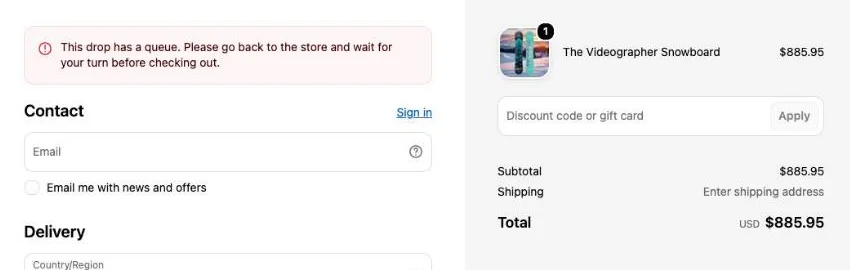
Shopify checkout stopping a shopper who skipped the line, with a message asking them to return to the store and wait for their turn before checking out.

A checkout rule checks every order during the drop. A shopper who reaches checkout without a pass from the line, through a shared cart link, Buy it now or a saved cart, sees a message asking them to return to the store and wait their turn. Outside the drop, checkout works as usual.

What you see

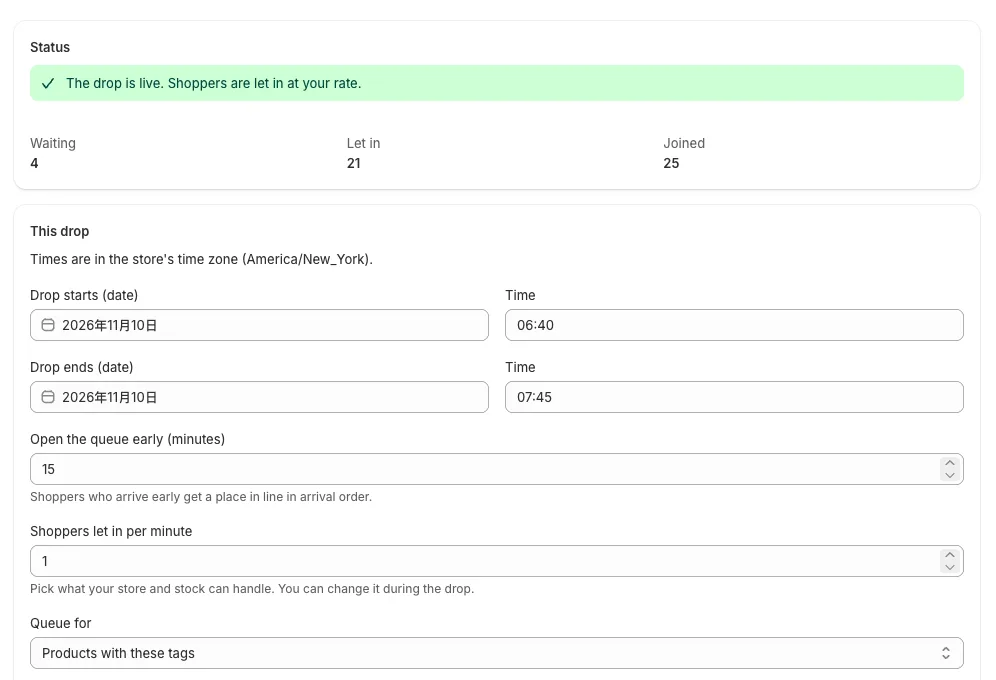
The app in the Shopify admin during a drop: 4 waiting, 21 let in, 25 joined, and the drop's times, rate and tagged products.

Schedule the drop in your Shopify admin: when it starts and ends, how early the queue opens, how many shoppers to let in per minute, and whether the queue covers the whole store or only products with certain tags. Watch how many are waiting and let in as it runs, change the rate during the drop, or end it early.

Plans

Free

$0
  • Queued shoppers a month 5,000
  • Waiting at once 1,000
  • Hide "Powered by Hibira" No

Drop

$29 / 30 days
  • Queued shoppers a month 50,000
  • Waiting at once 5,000
  • Hide "Powered by Hibira" Yes

Launch

$99 / 30 days
  • Queued shoppers a month 500,000
  • Waiting at once 20,000
  • Hide "Powered by Hibira" Yes

Event

$299 / 30 days
  • Queued shoppers a month 3,000,000
  • Waiting at once 50,000
  • Hide "Powered by Hibira" Yes

One-off event

$49 once
  • Queued shoppers a month +200,000 for 72 hours
  • Waiting at once 20,000
  • Hide "Powered by Hibira" Yes

Plans are billed by Shopify on your store invoice. A shopper counts once per drop, however often they come back. Past your plan's numbers the line keeps working and nobody is turned away; the app asks you to move up.

How to set it up

  1. Install Hibira Waiting Room on your store.
  2. Turn on the app embed: open the app and press Open theme editor, turn on Hibira Waiting Room, then Save. It does nothing until a drop is scheduled.
  3. Schedule your drop in the app: times, rate and which products. The checkout rule is added for you.

The setup guide has every setting.

Frequently asked questions

Which Shopify plans does it work on?

Every plan except Starter. You don't need Shopify Plus: the checkout rule comes with the app.

What do shoppers see outside a drop?

Nothing. The store works as usual before the queue opens and after the drop ends, and products outside the drop's tags are never queued.

Can I change the rate while the drop is running?

Yes. Change shoppers let in per minute and save; the line speeds up or slows down at once, and everyone keeps their place.

What happens after the drop ends?

Checkout opens to everyone again. Your next drop starts a fresh line from number 1.

Does it slow my store down?

No. The app embed is a small script that only acts on queued pages during a drop, and the waiting page is served by Hibira, not your store.

Do I need a Hibira account?

No. Install the app and turn on the embed; the app sets everything up for your store.