
Official package · Automation and infrastructure
Shopify app for a fair queue during drops
Install Hibira Waiting Room from the Shopify App Store, turn on its app embed and schedule a drop. Shoppers wait in a fair line with their place and wait time and are let in at the rate you choose, and a checkout rule stops anyone who skips the line. No Shopify Plus needed.
Hibira Waiting Room (Shopify app)GitHub ↗
- A hosted waiting page with each shopper's place, the people ahead and an estimated wait, in seven languages.
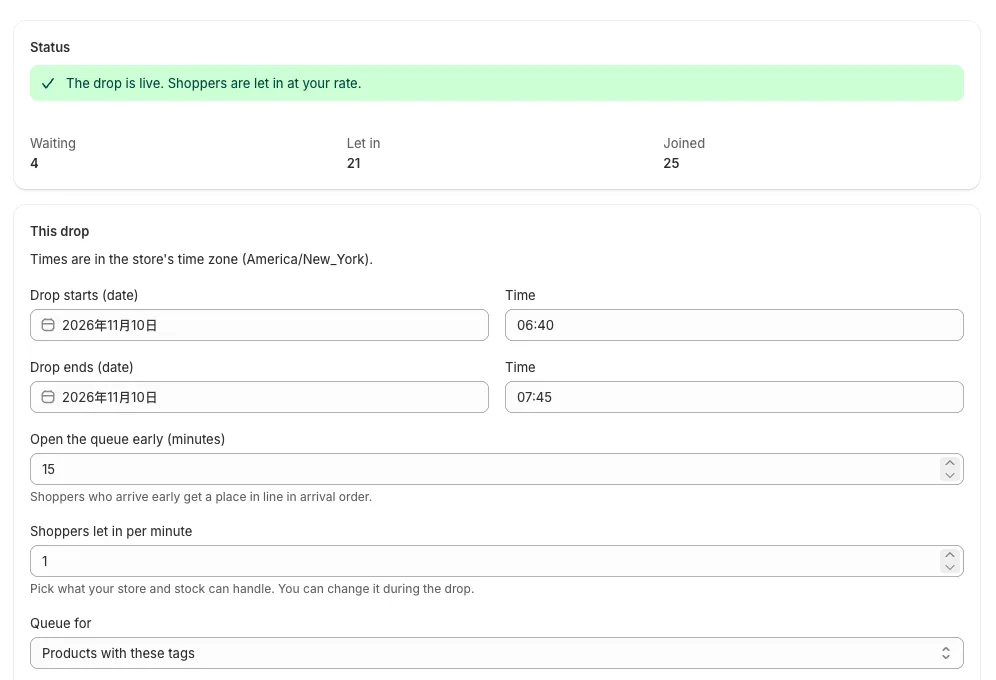
- Queue the whole store or only products with certain tags, and open the line early so arrival order decides.
- A checkout rule stops orders without a pass during the drop, including shared cart links and Buy it now.
- Watch waiting and let-in counts live in your Shopify admin, and change the rate while the drop runs.
Sign in to see these snippets with your own cluster host. Sign in
Install
Shopify admin → Apps → Shopify App Store
  → search "Hibira Waiting Room" → Install
The app opens in your admin. There is nothing to sign up for.
Turn it on in your theme
Hibira Waiting Room → Setup → Open theme editor
  → turn on "Hibira Waiting Room" → Save
It does nothing until a drop is scheduled.
Schedule a drop
Hibira Waiting Room → Schedule a drop
  Drop starts / Drop ends        2026-12-01 10:00 → 12:00
  Open the queue early (minutes) 15
  Shoppers let in per minute     60
  Queue for                      Products with these tags: drop
  → Schedule drop
Before you start
- The checkout rule is added for you under Settings → Checkout → Checkout rules and is on only during a drop. It works on every Shopify plan except Starter.
- Free covers 5,000 queued shoppers a month. Drop, Launch and Event plans, and a one-off event pass, are billed by Shopify on your invoice. Development stores get test charges.
- Each drop starts a new line from number 1. Changing the rate during a drop keeps everyone's place.
Use the app key from your dashboard; the secret stays on your server. Channels, events and authorization endpoints work exactly as they do with Pusher. Create your free account →