
แพ็กเกจอย่างเป็นทางการ · เฟรมเวิร์ก
อัปเดตสดสำหรับหน้าแอดมิน Refine
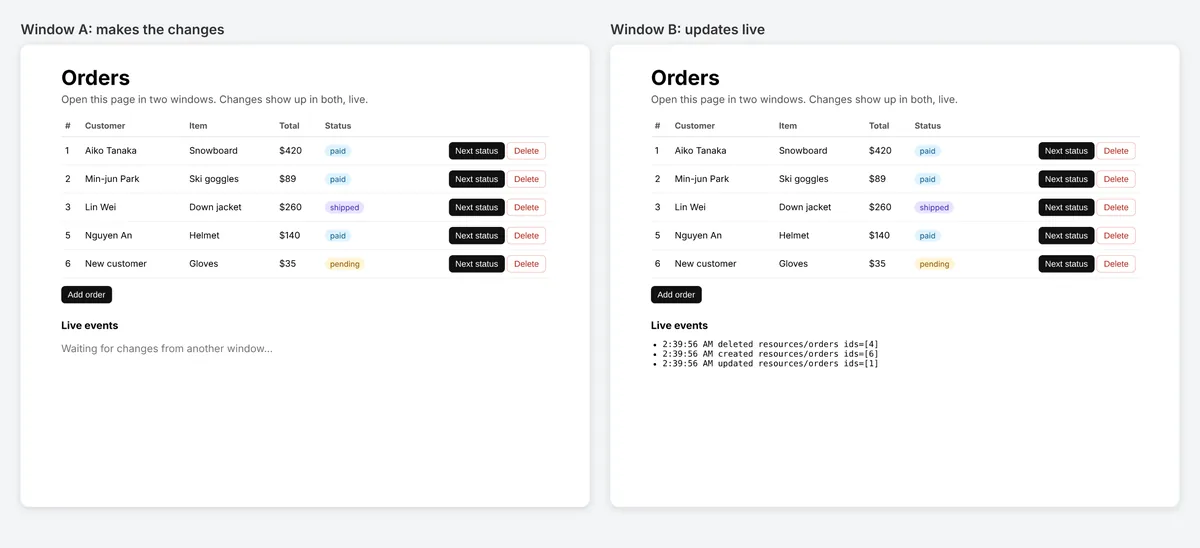
liveProvider สำหรับ Refine: รายการ ข้อมูล และแดชบอร์ดอัปเดตเองเมื่อมีคนอื่นเปลี่ยนข้อมูล ใช้ได้กับ Refine 4 และ 5 ทุก UI kit และทุก data provider


@hibira-io/refinenpm ↗GitHub ↗
วิธีที่เร็วที่สุด: ปลั๊กอิน Hibira กับพรอมต์เดียว
ติดตั้งปลั๊กอินในเอเจนต์เขียนโค้ด AI ของคุณแล้ววางพรอมต์ เอเจนต์จะลงชื่อเข้าใช้ สร้างแอปฟรีหากจำเป็น เขียนโค้ด และส่งอีเวนต์ทดสอบให้ GitHub ↗
ติดตั้งปลั๊กอิน
claude plugin marketplace add hibira-io/agent-plugin
claude plugin install hibira@hibira
วางพรอมต์นี้
Add Hibira Refine (@hibira-io/refine) to this project.
Follow https://hibira.io/guides/refine, adapted to how this project is already set up.
If I have no Hibira app yet, create a Free one that allows http://localhost so I can test right away.
Keep the app key and secret in environment variables, add placeholders to .env.example, and never commit real values or send the secret to a browser.
When you are done, send a test event, show me it arriving, and list the files you changed.
อยากทำเองใช่ไหม ขั้นตอนด้านล่างมีดังนี้:
- เมื่อตั้ง liveMode: "auto" แล้ว useList, useOne, useTable, useForm และ useShow จะดึงข้อมูลใหม่เอง
- ช่อง private พร้อม endpoint ยืนยันสิทธิ์ของคุณเอง และ hooks บนทรัพยากรเดียวกันใช้การสมัครรับร่วมกัน
- publishLiveEvent() ส่งอีเวนต์จาก API ของคุณหลังทุกการเปลี่ยนแปลง และเว้นแท็บที่เป็นผู้เปลี่ยนได้
ลงชื่อเข้าใช้เพื่อดูโค้ดตัวอย่างเหล่านี้พร้อมโฮสต์คลัสเตอร์ของคุณเอง ลงชื่อเข้าใช้
ติดตั้ง
npm install @hibira-io/refine pusher-js
# on your backend
npm install pusher
ตั้งค่า
import { Refine } from '@refinedev/core';
import Pusher from 'pusher-js';
import { liveProvider } from '@hibira-io/refine';

const pusher = new Pusher(import.meta.env.VITE_HIBIRA_KEY, {
  cluster: 'hkg',
  wsHost: 'ws.hibira.io',
  channelAuthorization: { endpoint: '/api/hibira/auth', transport: 'ajax' },
});

export const App = () => (
  <Refine
    dataProvider={dataProvider}
    liveProvider={liveProvider(pusher, { channelPrefix: 'private-', publish: false })}
    options={{ liveMode: 'auto' }}
  />
);
ใช้งาน
import Pusher from 'pusher';
import { publishLiveEvent } from '@hibira-io/refine/server';

const pusher = new Pusher({
  appId: process.env.HIBIRA_APP_ID!,
  key: process.env.HIBIRA_KEY!,
  secret: process.env.HIBIRA_SECRET!,
  host: 'ws.hibira.io',
  useTLS: true,
});

// after updating post 42
await publishLiveEvent(pusher, { resource: 'posts', type: 'updated', ids: [42] }, { channelPrefix: 'private-', socketId: req.headers['x-socket-id'] });
ก่อนเริ่ม
- แชนเนล private และ presence ต้องมี auth endpoint บนแบ็กเอนด์ที่ลงนามการสมัครรับด้วยซีเคร็ตของแอป เหมือนกับ pusher-js
- Laravel ส่งอีเวนต์เดียวกันได้: broadcast "refine" บน resources.posts ด้วยเนื้อหารูปแบบเดียวกับ LiveEvent ของ Refine
ใช้ app key จากแดชบอร์ดของคุณ ส่วน secret ให้เก็บไว้บนเซิร์ฟเวอร์เท่านั้น ช่อง อีเวนต์ และ endpoint การยืนยันสิทธิ์ทำงานเหมือนกับที่ใช้กับ Pusher ทุกประการ สร้างบัญชีฟรีของคุณ →