
แพ็กเกจอย่างเป็นทางการ · ชิ้นส่วนเรียลไทม์
แก้ไขเอกสารร่วมกันด้วย Yjs
Yjs provider: เอกสารที่แชร์และเคอร์เซอร์สดส่งผ่านช่อง private หรือ presence ทำให้ Tiptap, BlockNote, ProseMirror, CodeMirror, Monaco และ Quill ใช้งานได้โดยไม่ต้องตั้งเซิร์ฟเวอร์ y-websocket เอง


วิธีที่เร็วที่สุด: ปลั๊กอิน Hibira กับพรอมต์เดียว
ติดตั้งปลั๊กอินในเอเจนต์เขียนโค้ด AI ของคุณแล้ววางพรอมต์ เอเจนต์จะลงชื่อเข้าใช้ สร้างแอปฟรีหากจำเป็น เขียนโค้ด และส่งอีเวนต์ทดสอบให้ GitHub ↗
ติดตั้งปลั๊กอิน
claude plugin marketplace add hibira-io/agent-plugin
claude plugin install hibira@hibira
วางพรอมต์นี้
Add Hibira Yjs (y-hibira) to this project.
Follow https://hibira.io/guides/y-hibira, adapted to how this project is already set up.
If I have no Hibira app yet, create a Free one that allows http://localhost so I can test right away.
Keep the app key and secret in environment variables, add placeholders to .env.example, and never commit real values or send the secret to a browser.
When you are done, send a test event, show me it arriving, and list the files you changed.
- แต่ละเครื่องซิงก์กันผ่าน client events และการแก้ไขระหว่างออฟไลน์จะรวมกันเมื่อเชื่อมต่อใหม่
- แชร์ชื่อ เคอร์เซอร์ และส่วนที่เลือกผ่าน awareness บนช่อง presence สมาชิกที่หลุดจะถูกลบออกทันที
- ใช้กับ pusher-js หรือช่องของ Laravel Echo มีการจำกัดอัตราการส่ง และแบ่งการอัปเดตขนาดใหญ่เป็นส่วน ๆ
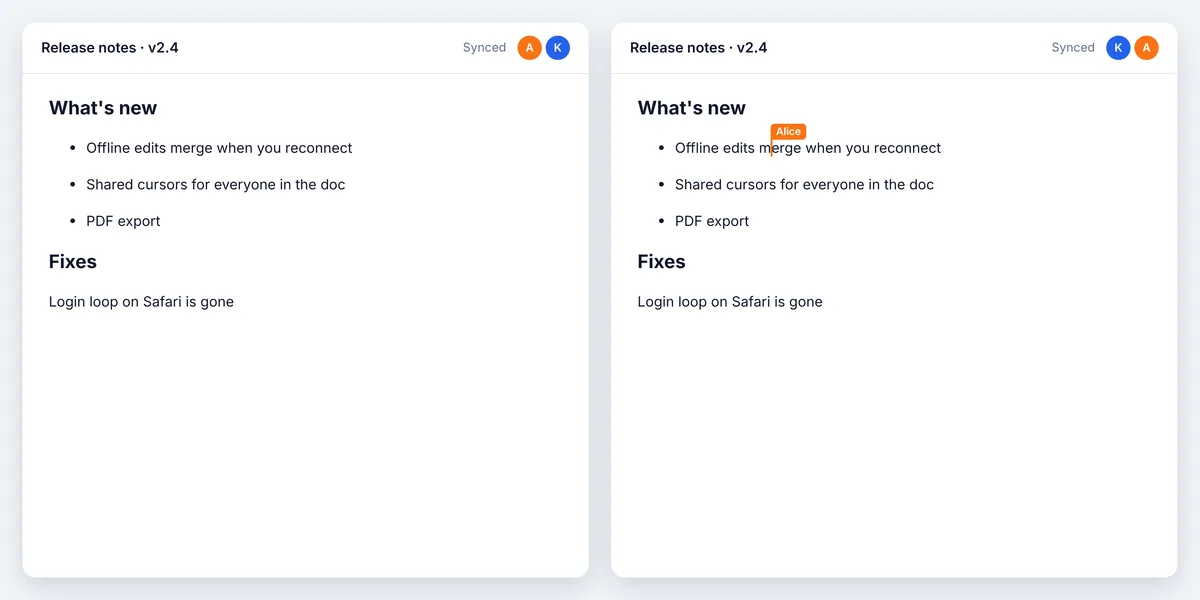
ลงชื่อเข้าใช้เพื่อดูโค้ดตัวอย่างเหล่านี้พร้อมโฮสต์คลัสเตอร์ของคุณเอง ลงชื่อเข้าใช้
ติดตั้ง
npm install y-hibira yjs pusher-jsใช้งาน
import * as Y from 'yjs';
import Pusher from 'pusher-js';
import { HibiraProvider } from 'y-hibira';

const pusher = new Pusher('YOUR_APP_KEY', {
  cluster: 'hkg',
  wsHost: 'ws.hibira.io',
  channelAuthorization: { endpoint: '/broadcasting/auth' },
});

const doc = new Y.Doc();
const provider = new HibiraProvider(pusher, 'presence-doc-42', doc);
provider.awareness.setLocalStateField('user', { name: 'Alice', color: '#f97316' });
// Tiptap: Collaboration.configure({ document: doc }) and CollaborationCaret.configure({ provider })
ก่อนเริ่ม
- เปิด Allow client events ในการตั้งค่าแอป เพราะแต่ละเครื่องส่งการอัปเดตเอกสารถึงกันเป็น client events
- แชนเนล private และ presence ต้องมี auth endpoint บนแบ็กเอนด์ที่ลงนามการสมัครรับด้วยซีเคร็ตของแอป เหมือนกับ pusher-js
- เซิร์ฟเวอร์ส่งต่อการอัปเดตแต่ไม่ได้เก็บไว้ บันทึกเอกสารเอง (Y.encodeStateAsUpdate) และโหลดก่อนเชื่อมต่อ
ใช้ app key จากแดชบอร์ดของคุณ ส่วน secret ให้เก็บไว้บนเซิร์ฟเวอร์เท่านั้น ช่อง อีเวนต์ และ endpoint การยืนยันสิทธิ์ทำงานเหมือนกับที่ใช้กับ Pusher ทุกประการ สร้างบัญชีฟรีของคุณ →