
Gói chính thức · Framework
Cập nhật trực tiếp cho trang quản trị Refine
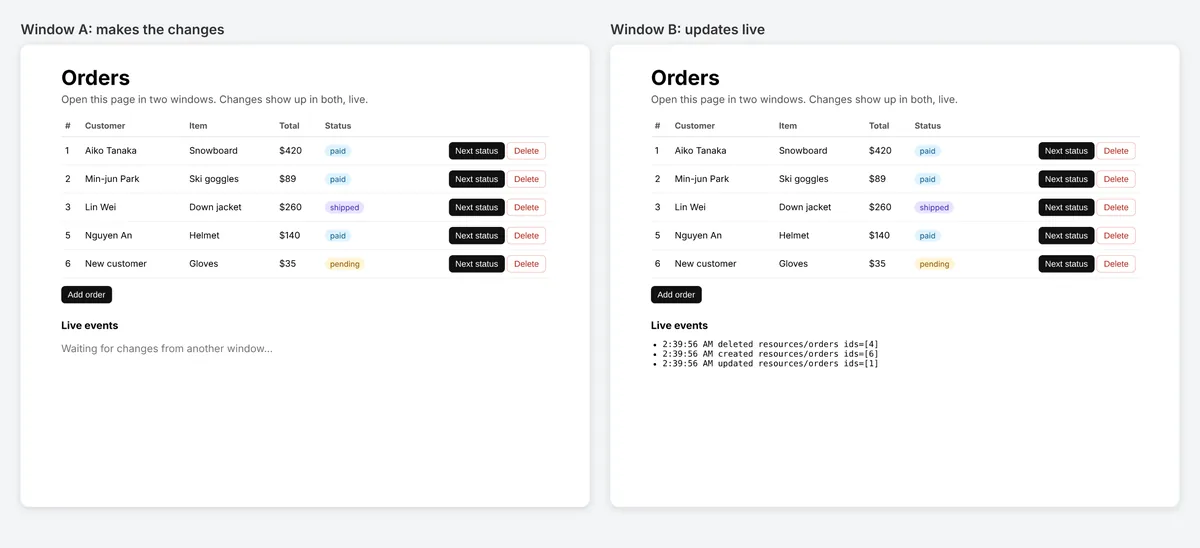
Một liveProvider cho Refine: danh sách, bản ghi và dashboard tự cập nhật khi người khác thay đổi dữ liệu. Refine 4 và 5, mọi bộ UI và mọi data provider.


@hibira-io/refinenpm ↗GitHub ↗
Cách nhanh nhất: plugin Hibira và một prompt
Cài plugin vào agent lập trình AI của bạn rồi dán prompt. Agent sẽ đăng nhập, tạo ứng dụng miễn phí nếu cần, viết mã và gửi một sự kiện thử. GitHub ↗
Cài plugin
claude plugin marketplace add hibira-io/agent-plugin
claude plugin install hibira@hibira
Dán prompt này
Add Hibira Refine (@hibira-io/refine) to this project.
Follow https://hibira.io/guides/refine, adapted to how this project is already set up.
If I have no Hibira app yet, create a Free one that allows http://localhost so I can test right away.
Keep the app key and secret in environment variables, add placeholders to .env.example, and never commit real values or send the secret to a browser.
When you are done, send a test event, show me it arriving, and list the files you changed.
- useList, useOne, useTable, useForm và useShow tự tải lại với liveMode: "auto".
- Kênh private với endpoint xác thực của riêng bạn, và các hook trên cùng resource dùng chung một lượt đăng ký.
- publishLiveEvent() gửi sự kiện từ API của bạn sau mỗi thay đổi và có thể bỏ qua tab đã thực hiện thay đổi.
Đăng nhập để xem các đoạn mã này với host cụm của riêng bạn. Đăng nhập
Cài đặt
npm install @hibira-io/refine pusher-js
# on your backend
npm install pusher
Thiết lập
import { Refine } from '@refinedev/core';
import Pusher from 'pusher-js';
import { liveProvider } from '@hibira-io/refine';

const pusher = new Pusher(import.meta.env.VITE_HIBIRA_KEY, {
  cluster: 'hkg',
  wsHost: 'ws.hibira.io',
  channelAuthorization: { endpoint: '/api/hibira/auth', transport: 'ajax' },
});

export const App = () => (
  <Refine
    dataProvider={dataProvider}
    liveProvider={liveProvider(pusher, { channelPrefix: 'private-', publish: false })}
    options={{ liveMode: 'auto' }}
  />
);
Sử dụng
import Pusher from 'pusher';
import { publishLiveEvent } from '@hibira-io/refine/server';

const pusher = new Pusher({
  appId: process.env.HIBIRA_APP_ID!,
  key: process.env.HIBIRA_KEY!,
  secret: process.env.HIBIRA_SECRET!,
  host: 'ws.hibira.io',
  useTLS: true,
});

// after updating post 42
await publishLiveEvent(pusher, { resource: 'posts', type: 'updated', ids: [42] }, { channelPrefix: 'private-', socketId: req.headers['x-socket-id'] });
Trước khi bắt đầu
- Kênh private và presence cần một auth endpoint trên backend ký các lượt đăng ký bằng secret của ứng dụng, giống như với pusher-js.
- Laravel cũng gửi được các sự kiện này: broadcast "refine" trên resources.posts với nội dung theo dạng LiveEvent của Refine.
Dùng app key từ bảng điều khiển; secret chỉ để trên máy chủ của bạn. Kênh, sự kiện và endpoint xác thực hoạt động y như với Pusher. Tạo tài khoản miễn phí →