
공식 패키지 · 프레임워크
Refine 관리자 화면 실시간 업데이트
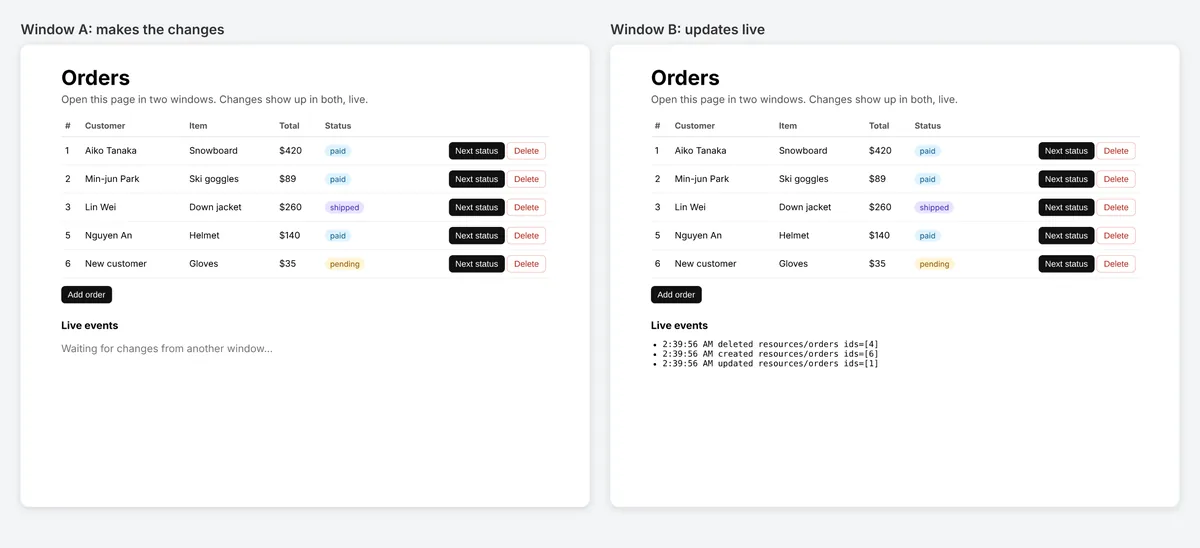
Refine용 liveProvider: 누군가 데이터를 바꾸면 목록, 상세, 대시보드가 저절로 갱신됩니다. Refine 4와 5, 모든 UI 키트와 데이터 프로바이더에서 동작합니다.


@hibira-io/refinenpm ↗GitHub ↗
가장 빠른 방법: Hibira 플러그인과 프롬프트 하나
AI 코딩 에이전트에 플러그인을 설치하고 프롬프트를 붙여 넣으세요. 에이전트가 로그인하고, 필요하면 무료 앱을 만들고, 코드를 작성한 뒤 테스트 이벤트를 보냅니다. GitHub ↗
플러그인 설치
claude plugin marketplace add hibira-io/agent-plugin
claude plugin install hibira@hibira
이 프롬프트 붙여 넣기
Add Hibira Refine (@hibira-io/refine) to this project.
Follow https://hibira.io/guides/refine, adapted to how this project is already set up.
If I have no Hibira app yet, create a Free one that allows http://localhost so I can test right away.
Keep the app key and secret in environment variables, add placeholders to .env.example, and never commit real values or send the secret to a browser.
When you are done, send a test event, show me it arriving, and list the files you changed.
- liveMode: "auto"이면 useList, useOne, useTable, useForm, useShow가 알아서 다시 불러옵니다.
- 자체 인증 엔드포인트를 쓰는 private 채널, 같은 리소스의 훅은 구독 하나를 공유합니다.
- publishLiveEvent()는 변경할 때마다 API에서 이벤트를 보내고, 변경한 탭은 제외할 수 있습니다.
로그인하면 예제 코드에 내 클러스터 호스트가 채워집니다. 로그인
설치
npm install @hibira-io/refine pusher-js
# on your backend
npm install pusher
설정하기
import { Refine } from '@refinedev/core';
import Pusher from 'pusher-js';
import { liveProvider } from '@hibira-io/refine';

const pusher = new Pusher(import.meta.env.VITE_HIBIRA_KEY, {
  cluster: 'hkg',
  wsHost: 'ws.hibira.io',
  channelAuthorization: { endpoint: '/api/hibira/auth', transport: 'ajax' },
});

export const App = () => (
  <Refine
    dataProvider={dataProvider}
    liveProvider={liveProvider(pusher, { channelPrefix: 'private-', publish: false })}
    options={{ liveMode: 'auto' }}
  />
);
사용하기
import Pusher from 'pusher';
import { publishLiveEvent } from '@hibira-io/refine/server';

const pusher = new Pusher({
  appId: process.env.HIBIRA_APP_ID!,
  key: process.env.HIBIRA_KEY!,
  secret: process.env.HIBIRA_SECRET!,
  host: 'ws.hibira.io',
  useTLS: true,
});

// after updating post 42
await publishLiveEvent(pusher, { resource: 'posts', type: 'updated', ids: [42] }, { channelPrefix: 'private-', socketId: req.headers['x-socket-id'] });
시작하기 전에
- 프라이빗 채널과 프레즌스 채널에는 pusher-js와 마찬가지로, 앱 시크릿으로 구독에 서명하는 인증 엔드포인트가 백엔드에 필요합니다.
- Laravel에서도 같은 이벤트를 보낼 수 있습니다. resources.posts에 "refine"을 Refine LiveEvent와 같은 형태의 본문으로 브로드캐스트하세요.
대시보드의 앱 키를 사용하세요. 시크릿은 서버에만 둡니다. 채널, 이벤트, 인가 엔드포인트는 Pusher와 똑같이 동작합니다. 무료 계정 만들기 →