
Supervisor approval for database changes
Reads run at once; each change waits until a supervisor has seen its exact SQL and estimated rows on their phone, then runs once. Your database never leaves your servers.
Letting staff, scripts or an assistant query your database saves hours. Letting them change it without anyone looking is how a "clean up old carts" request deletes last week's orders. Hibira puts a supervisor between the two: reads run at once, and each change waits until a supervisor has seen its exact SQL and how many rows it will touch, on their phone, and said yes. Your database and its credentials never leave your servers.
What your users get
- Answers to read-only questions right away, with no one in the loop.
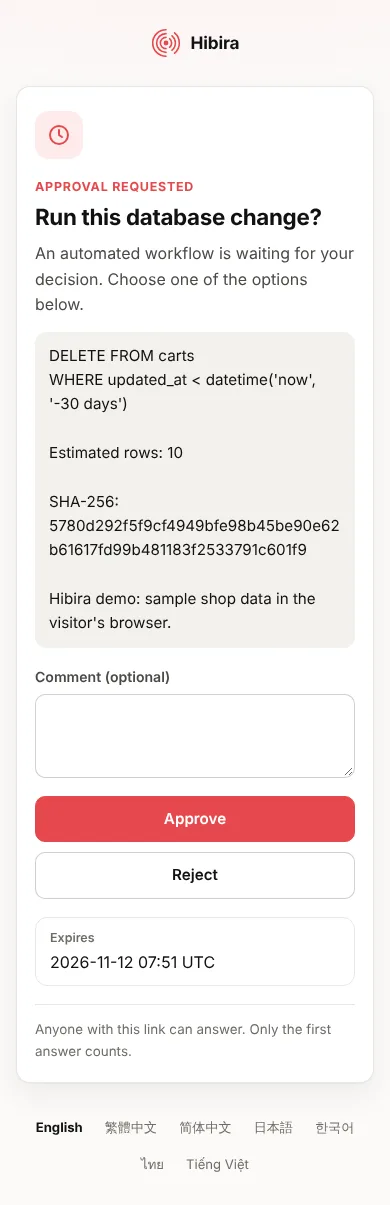
- For each change, an approval page the supervisor can open from a push notification or a QR code: the statement, the estimated rows, the query plan and a fingerprint, with Approve and Reject.
- The result the moment the supervisor decides, on the requester's screen, without refreshing. A rejection comes with the supervisor's reason.
- A guarantee that what runs is exactly what was approved, and that it runs once.

Built with
- Approvals:
POST /apps/APP_ID/approvals(or the MCP server'srequest_approval) creates a Hibira-hosted approval page and announces the decision on a channel. - A private channel per console or run, such as
private-sqlgate-<random>, where theapprovalevent arrives. Nothing polls. - Push notifications (optional) to reach the supervisor's phone with the link.
- @hibira-io/approvals/sql:
classifySql(),sqlFingerprint()andassertApprovedSql()for Node.js, and the same in Python.
Try it on demos.hibira.io: pick a change, scan the QR code with your phone and approve it.
Step 1: let reads through, stop everything else
classifySql() calls a statement a read only when it is sure: one statement that starts with SELECT, WITH, EXPLAIN or SHOW and has no data-modifying part. Several statements, WITH ... DELETE, EXPLAIN ANALYZE, SELECT ... INTO, FOR UPDATE and anything it cannot parse for certain are changes. Run reads in a read-only transaction anyway, so a statement it misjudges fails instead of writing:
import pg from 'pg';
import { classifySql } from '@hibira-io/approvals/sql';

const pool = new pg.Pool({ connectionString: process.env.DATABASE_URL });

export async function runSql(sql, requestedBy) {
  if (classifySql(sql) === 'read') return { rows: await readOnly(sql) };
  return { approval: await askSupervisor(sql, requestedBy) };
}

async function readOnly(sql) {
  const db = await pool.connect();
  try {
    await db.query('BEGIN READ ONLY');
    const { rows } = await db.query(sql);
    await db.query('COMMIT');
    return rows.slice(0, 200);
  } catch (err) {
    await db.query('ROLLBACK');
    throw err;
  } finally {
    db.release();
  }
}
Step 2: show the supervisor what the change will do
Estimate the rows before asking. EXPLAIN never runs the statement; a dry run in a transaction that rolls back gives the exact count, but does run it, so give it a timeout. Fingerprint the exact text: the approval is for this statement and no other.
import { sqlFingerprint } from '@hibira-io/approvals/sql';

async function preview(sql) {
  const db = await pool.connect();
  try {
    await db.query('BEGIN');
    await db.query("SET LOCAL statement_timeout = '5s'");
    const { rowCount } = await db.query(sql);
    return { rows: rowCount, fingerprint: await sqlFingerprint(sql) };
  } finally {
    await db.query('ROLLBACK');
    db.release();
  }
}
Step 3: ask for approval
Create the request with the statement and its preview as details, and the channel to announce the decision on. Keep the statement and fingerprint on your side, keyed by the approval ID. Only the request text goes to Hibira: no credentials, no rows.
import Pusher from 'pusher';

const hibira = new Pusher({ appId: process.env.HIBIRA_APP_ID, key: process.env.HIBIRA_KEY, secret: process.env.HIBIRA_SECRET, host: 'ws.hibira.io', useTLS: true });

async function askSupervisor(sql, requestedBy) {
  const { rows, fingerprint } = await preview(sql);
  const res = await hibira.post({
    path: '/approvals',
    body: {
      title: 'Run this database change?',
      details: `${sql}\n\nEstimated rows: ${rows}\n\nSHA-256: ${fingerprint}`,
      options: ['Approve', 'Reject'],
      channel: `private-sqlgate-${requestedBy.consoleId}`,
      push_users: ['supervisor-42'],
      expires_in_minutes: 15,
      agent: 'SQL console',
    },
  });
  const approval = await res.json();
  await pool.query('INSERT INTO pending_changes (approval_id, sql, fingerprint) VALUES ($1, $2, $3)', [approval.approval_id, sql, fingerprint]);
  return { id: approval.approval_id, url: approval.url, rows };
}
The supervisor gets a push notification with the link (or scans it from the requester's screen) and answers on a page in their language.
Step 4: run it once when the answer arrives
The decision arrives as an approval event on the channel. Treat it as a doorbell: read the answer once from the API, then run the stored statement, after checking it still matches the fingerprint. Claiming the row first makes it run once, even if two events or two workers race:
import { assertApprovedSql } from '@hibira-io/approvals/sql';

// In the requester's page (pusher-js), or a worker that keeps a connection open:
channel.bind('approval', ({ id, reason }) => {
  if (reason === 'decided') fetch(`/api/changes/${id}/run`, { method: 'POST' });
});

// POST /api/changes/:id/run on your server:
export async function runApproved(id) {
  const res = await hibira.get({ path: `/approvals/${id}` });
  const answer = await res.json();
  if (answer.status !== 'approved') return { status: answer.status, comment: answer.comment };
  const { rows } = await pool.query('UPDATE pending_changes SET ran_at = now() WHERE approval_id = $1 AND ran_at IS NULL RETURNING sql, fingerprint', [id]);
  if (!rows.length) return { status: 'already run' };
  await assertApprovedSql(rows[0].sql, rows[0].fingerprint);
  const result = await pool.query(rows[0].sql);
  return { status: 'ran', rows: result.rowCount };
}
Already reaching the database through an MCP server?
If your team works with the database from Claude, Cursor, ChatGPT or another MCP client, through a server such as DBHub, postgres-mcp or Supabase MCP, put mcp-approval-gate in front of that server. You don't need to change any code. Reads pass through. Each insert, update, delete or schema change waits on the same approval page and then runs once, exactly as approved.
npx -y @hibira-io/mcp-approval-gate --label shop-production --push-interests db-approvals \
-- npx -y @bytebase/dbhub --transport stdio --dsn "$DATABASE_URL"The same gate in your stack
- Vercel AI SDK, Mastra, LangGraph (JavaScript and Python): @hibira-io/approvals has a recipe for each:
needsApprovalorrequireApprovalas a function of the statement, and an approval inbox in your own app that shows the preview under each call. - Laravel: filament-approvals asks inside your Filament panel; its README has a
RunSqltool for the Laravel AI SDK. - n8n, Make, Activepieces and Dify: a code step classifies the statement, the Hibira approval step asks the supervisor and waits, and the database step runs only on the approve branch. Each one's README has the workflow.
- Claude, Cursor and other MCP clients: the MCP server's
request_approvalasks the same way from a chat. - Any database MCP server: mcp-approval-gate wraps DBHub, postgres-mcp, Supabase MCP and others with no code changes.