
官方包 · 实时功能组件
用 Yjs 做协作编辑
一个 Yjs provider:共享文档和实时光标通过 private 或 presence 频道传输,Tiptap、BlockNote、ProseMirror、CodeMirror、Monaco 和 Quill 都能直接用,不必自己部署 y-websocket 服务器。


最快的方式:装好 Hibira 插件,粘贴一段提示词
在你的 AI 编程助手装好插件,再粘贴提示词。助手会帮你登录、需要时创建免费应用、写好代码并发送测试事件。 GitHub ↗
安装插件
claude plugin marketplace add hibira-io/agent-plugin
claude plugin install hibira@hibira
粘贴这段提示词
Add Hibira Yjs (y-hibira) to this project.
Follow https://hibira.io/guides/y-hibira, adapted to how this project is already set up.
If I have no Hibira app yet, create a Free one that allows http://localhost so I can test right away.
Keep the app key and secret in environment variables, add placeholders to .env.example, and never commit real values or send the secret to a browser.
When you are done, send a test event, show me it arriving, and list the files you changed.
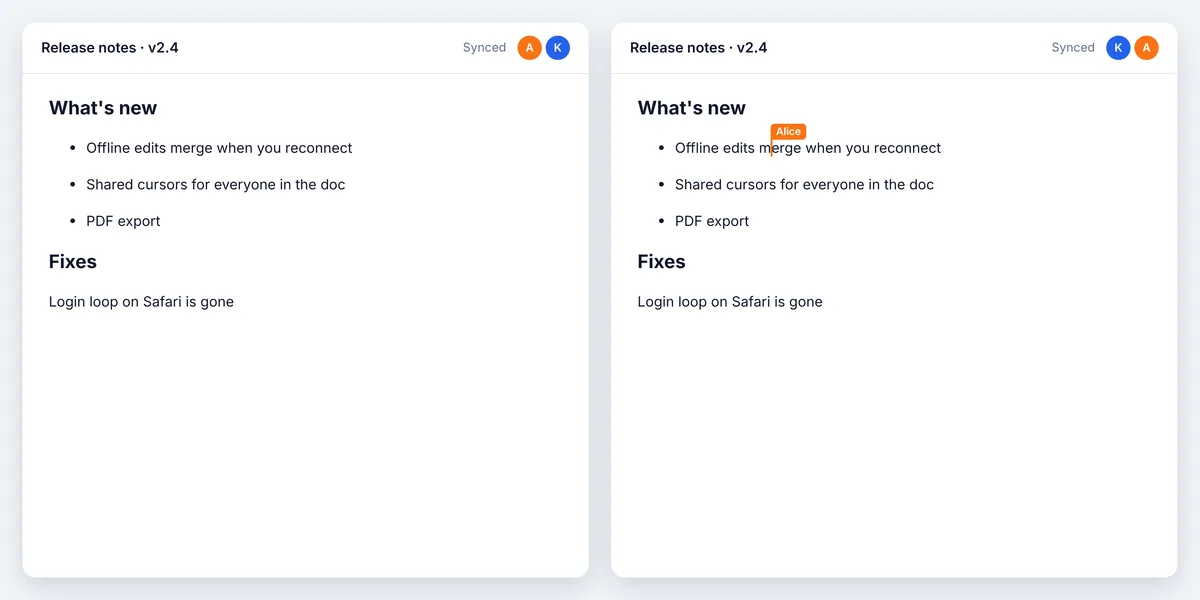
- 各端通过 client events 互相同步;离线时的编辑会在重新连接后合并。
- 用 awareness 共享名字、光标和选区;在 presence 频道上,断线的成员会立即被移除。
- 支持 pusher-js 或 Laravel Echo 的频道,内置发送频率限制,较大的更新会自动分段。
登录后,示例代码会自动填入您的集群主机。 登录
安装
npm install y-hibira yjs pusher-js使用
import * as Y from 'yjs';
import Pusher from 'pusher-js';
import { HibiraProvider } from 'y-hibira';

const pusher = new Pusher('YOUR_APP_KEY', {
  cluster: 'hkg',
  wsHost: 'ws.hibira.io',
  channelAuthorization: { endpoint: '/broadcasting/auth' },
});

const doc = new Y.Doc();
const provider = new HibiraProvider(pusher, 'presence-doc-42', doc);
provider.awareness.setLocalStateField('user', { name: 'Alice', color: '#f97316' });
// Tiptap: Collaboration.configure({ document: doc }) and CollaborationCaret.configure({ provider })
开始之前
- 在应用设置中开启「Allow client events」:各端用 client events 互传文档更新。
- 私有频道和 presence 频道需要后端提供授权端点,用应用密钥签名订阅,做法与 pusher-js 相同。
- 服务器只转发更新,不会存储。请自行保存文档(Y.encodeStateAsUpdate),并在连接前加载。
请使用控制台中应用的 Key;Secret 只放在你的服务器上。频道、事件与授权端点的用法与 Pusher 完全相同。 免费创建账号 →