
公式パッケージ · フレームワーク
Refine 管理画面のリアルタイム更新
Refine の liveProvider:誰かがデータを変えると、一覧・詳細・ダッシュボードが自動で更新されます。Refine 4 と 5、どの UI キットやデータプロバイダーでも使えます。


@hibira-io/refinenpm ↗GitHub ↗
最速の方法:Hibira プラグインとプロンプト 1 つ
AI コーディングエージェントにプラグインを入れて、プロンプトを貼り付けるだけ。エージェントがサインインし、必要なら無料アプリを作成し、コードを書いてテストイベントを送ります。 GitHub ↗
プラグインをインストール
claude plugin marketplace add hibira-io/agent-plugin
claude plugin install hibira@hibira
このプロンプトを貼り付け
Add Hibira Refine (@hibira-io/refine) to this project.
Follow https://hibira.io/guides/refine, adapted to how this project is already set up.
If I have no Hibira app yet, create a Free one that allows http://localhost so I can test right away.
Keep the app key and secret in environment variables, add placeholders to .env.example, and never commit real values or send the secret to a browser.
When you are done, send a test event, show me it arriving, and list the files you changed.
- liveMode: "auto" にすると、useList、useOne、useTable、useForm、useShow が自動で再取得します。
- 自前の認証エンドポイントを使う private チャンネル。同じリソースのフックは 1 つの購読を共有します。
- publishLiveEvent() は変更のたびに API からイベントを送り、変更したタブを除外することもできます。
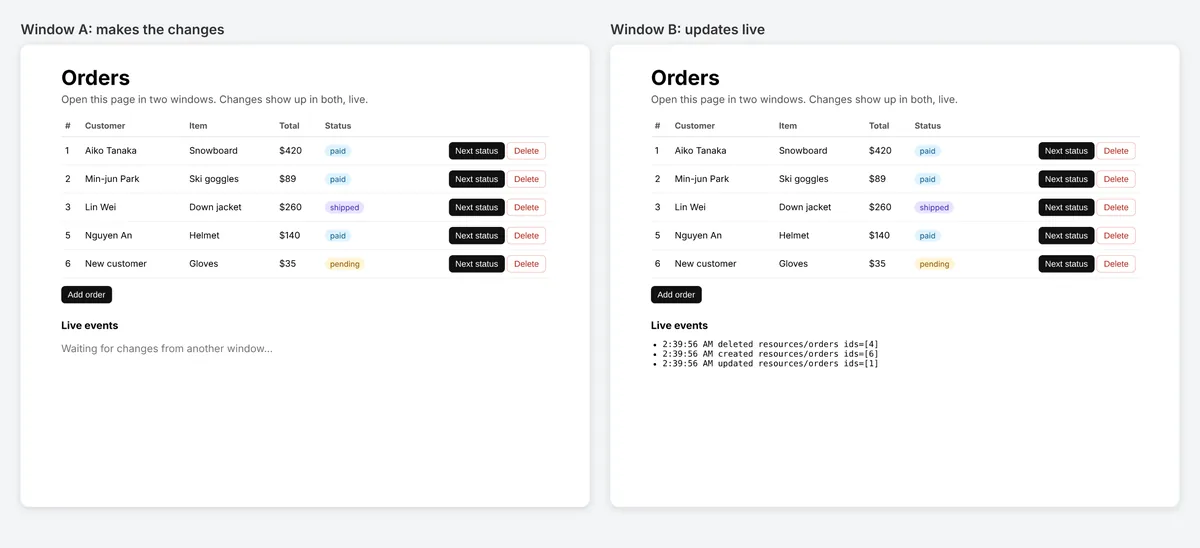
サインインすると、コード例にご自身のクラスターホストが入ります。 サインイン
インストール
npm install @hibira-io/refine pusher-js
# on your backend
npm install pusher
設定する
import { Refine } from '@refinedev/core';
import Pusher from 'pusher-js';
import { liveProvider } from '@hibira-io/refine';

const pusher = new Pusher(import.meta.env.VITE_HIBIRA_KEY, {
  cluster: 'hkg',
  wsHost: 'ws.hibira.io',
  channelAuthorization: { endpoint: '/api/hibira/auth', transport: 'ajax' },
});

export const App = () => (
  <Refine
    dataProvider={dataProvider}
    liveProvider={liveProvider(pusher, { channelPrefix: 'private-', publish: false })}
    options={{ liveMode: 'auto' }}
  />
);
使う
import Pusher from 'pusher';
import { publishLiveEvent } from '@hibira-io/refine/server';

const pusher = new Pusher({
  appId: process.env.HIBIRA_APP_ID!,
  key: process.env.HIBIRA_KEY!,
  secret: process.env.HIBIRA_SECRET!,
  host: 'ws.hibira.io',
  useTLS: true,
});

// after updating post 42
await publishLiveEvent(pusher, { resource: 'posts', type: 'updated', ids: [42] }, { channelPrefix: 'private-', socketId: req.headers['x-socket-id'] });
始める前に
- プライベートチャンネルとプレゼンスチャンネルには、pusher-js と同じく、アプリのシークレットで購読に署名する認可エンドポイントがバックエンドに必要です。
- Laravel からも同じイベントを送れます。resources.posts に「refine」を、Refine の LiveEvent と同じ形の本文でブロードキャストします。
ダッシュボードのアプリキーを使ってください。シークレットはサーバー側だけに置きます。チャンネル、イベント、認可エンドポイントは Pusher とまったく同じように動作します。 無料でアカウントを作成 →