
Official package · Frameworks
Live updates for Refine admin panels
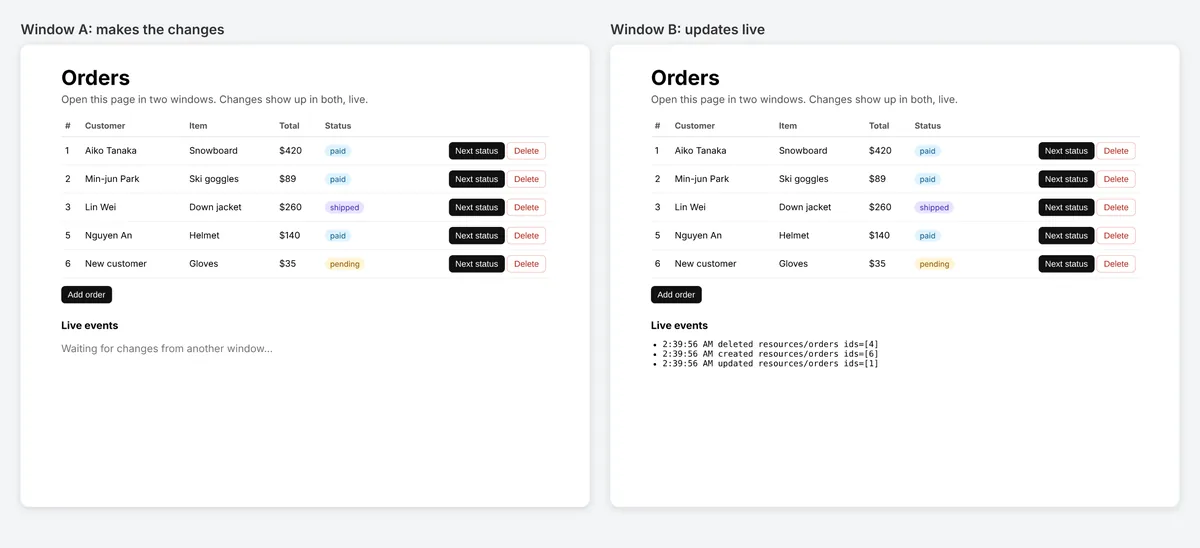
A liveProvider for Refine: lists, records and dashboards update by themselves when someone else changes the data. Refine 4 and 5, any UI kit and any data provider.


@hibira-io/refinenpm ↗GitHub ↗
Fastest way: one prompt with the Hibira plugin
Install the plugin in your AI coding agent and paste the prompt. The agent signs you in, creates a free app if you need one, writes the code and sends a test event. GitHub ↗
Install the plugin
claude plugin marketplace add hibira-io/agent-plugin
claude plugin install hibira@hibira
Paste this prompt
Add Hibira Refine (@hibira-io/refine) to this project.
Follow https://hibira.io/guides/refine, adapted to how this project is already set up.
If I have no Hibira app yet, create a Free one that allows http://localhost so I can test right away.
Keep the app key and secret in environment variables, add placeholders to .env.example, and never commit real values or send the secret to a browser.
When you are done, send a test event, show me it arriving, and list the files you changed.
Prefer to do it by hand? These are the steps below:
- useList, useOne, useTable, useForm and useShow refetch on their own with liveMode: "auto".
- Private channels with your own auth endpoint, and hooks on the same resource share one subscription.
- publishLiveEvent() sends events from your API after each change and can leave out the tab that made it.
Sign in to see these snippets with your own cluster host. Sign in
Install
npm install @hibira-io/refine pusher-js
# on your backend
npm install pusher
Set it up
import { Refine } from '@refinedev/core';
import Pusher from 'pusher-js';
import { liveProvider } from '@hibira-io/refine';

const pusher = new Pusher(import.meta.env.VITE_HIBIRA_KEY, {
  cluster: 'hkg',
  wsHost: 'ws.hibira.io',
  channelAuthorization: { endpoint: '/api/hibira/auth', transport: 'ajax' },
});

export const App = () => (
  <Refine
    dataProvider={dataProvider}
    liveProvider={liveProvider(pusher, { channelPrefix: 'private-', publish: false })}
    options={{ liveMode: 'auto' }}
  />
);
Use it
import Pusher from 'pusher';
import { publishLiveEvent } from '@hibira-io/refine/server';

const pusher = new Pusher({
  appId: process.env.HIBIRA_APP_ID!,
  key: process.env.HIBIRA_KEY!,
  secret: process.env.HIBIRA_SECRET!,
  host: 'ws.hibira.io',
  useTLS: true,
});

// after updating post 42
await publishLiveEvent(pusher, { resource: 'posts', type: 'updated', ids: [42] }, { channelPrefix: 'private-', socketId: req.headers['x-socket-id'] });
Before you start
- Private and presence channels need an auth endpoint on your backend that signs subscriptions with the app secret, as with pusher-js.
- Laravel can send the same events: broadcast "refine" on resources.posts with a body shaped like a Refine LiveEvent.
Use the app key from your dashboard; the secret stays on your server. Channels, events and authorization endpoints work exactly as they do with Pusher. Create your free account →